
A polished Etsy shop is not built by adding more decorative graphics to every listing. Buyers need to understand what the product is, what arrives after checkout, how it looks in real life, and why it belongs in that particular shop. Mockup templates, listing-image layouts and shop-branding kits can make that work faster—but they solve different problems, and they do not override Etsy’s image rules. We compared six Creative Fabrica resources by visible favorites, review history, stated contents, editing workflow and the details sellers should check before downloading.
Affiliate disclosure: This article contains affiliate links. TestedWise may earn a commission if you purchase through them, at no additional cost to you. Read the full disclosure.
This guide is for handmade sellers, digital-download shops, printable creators, small brands and print-on-demand sellers. It is not a guide to buying an editable bundle so you can resell the original Canva files. Creative Fabrica’s standard licenses do not permit redistributing the downloaded source files, and Etsy’s own rules require listing images to represent the item accurately.
We reviewed public Creative Fabrica product descriptions, visible favorite counts, ratings and review totals where available, plus the stated file contents and access notes. Favorites are saved-interest signals, not sales or downloads. Product descriptions are seller claims; TestedWise has not purchased, downloaded, edited or tested these products. Page captures were collected at different times, so the counts are useful for comparison, not a synchronized live ranking.
Some links in this guide are affiliate links. If you make a purchase through them, TestedWise may earn a commission at no additional cost to you.
1. Six Etsy seller resources at a glance
The table is ordered by the favorite counts visible in the product-page captures reviewed for this guide. A high favorite count can help identify products that shoppers have saved, but it does not prove that the item sells well, works smoothly in Canva or fits every Etsy category. Review counts matter too: a 5.0 score based on one review is a much smaller sample than a 4.5 score based on six reviews.
| Creative Fabrica listing | Favorites* | Rating | Best fit |
|---|---|---|---|
| 20 Etsy Listing Templates | 655 | 4.5 / 6 | A smaller starter set for repeatable listing layouts |
| Etsy Shop Branding Kit in Canva | 641 | No reviews shown | Shop banners, icons and order-receipt branding |
| 106 Etsy Listing Templates | 477 | 5.0 / 4 | A larger library for sellers with many digital products |
| Mockup Templates for Digital Products | 383 | 5.0 / 1 | Planners, journals, courses and digital-product scenes |
| Etsy Listing Mockup | 334 | 5.0 / 2 | A broader Etsy listing and shop-graphics bundle |
| Pink Store Listing Mockup Templates | 283 | 5.0 / 2 | A pink visual style for digital products and printables |
*Favorites are saved-interest signals, not sales, downloads or a quality score. Product-page counts can change. The Pink Store Listing Mockup page also contains a discrepancy between the number in its description and the more specific “You Get” section; this is explained in the product review below.
2. What is popular on Creative Fabrica?
The Etsy-related catalog is not a single category. Creative Fabrica groups products under tags and collections such as Etsy Mockups, Etsy Listing, Etsy Shop Kit and Etsy Shop Graphics. The public pages reviewed for this guide showed approximately 1,292 items under Etsy Mockups, 201 under Etsy Listing, 208 under Etsy Shop Kit and 784 in the Etsy Shop Graphics collection. A broader Digital Product Mockup tag showed more than 5,200 items, many of which are not specific to Etsy.
Those numbers show a substantial supply of ready-made graphics, but they also point to a crowded market. The more useful question is not “Which bundle has the most pages?” It is “Does this pack solve the visual problem I have without making the listing less accurate?” A shop selling handmade ceramics needs real product photography supported by detail layouts. A digital planner shop needs clear page previews and a realistic device mockup. A new shop may need a banner and icon before it needs another hundred listing slides.
The product shortlist therefore covers three related but different jobs:
- Listing-image templates: layouts for placing your own product images, key features, dimensions and delivery information into a consistent sequence.
- Mockup templates: scenes or frames that help present a product in context, such as a planner on a tablet or a printable on a desk.
- Shop-branding kits: coordinated banners, icons, receipt graphics and other storefront elements that help a shop look consistent.
We did not rank products by template count alone. We also looked at whether the seller states how the files are delivered, whether Canva is required, whether the templates are editable, what dimensions are supplied, and whether the page reveals any practical limitation.
3. Six Creative Fabrica picks compared
1. 20 Etsy Listing Templates — a compact starter set with useful buyer feedback

655 favorites · 4.5 from 6 reviews
Creative Fabrica listing: 20 Etsy Listing Templates by Sian Bilcliffe.
This is a smaller listing-image pack aimed at small businesses and coaches selling planners, printables, ebooks, digital products and giveaways. The seller describes 20 editable layouts with a pink-and-grey visual style. The workflow is straightforward: drag your product photos into the frames, then change colors, icons, text and element positions to suit your shop. The listing says the files can be accessed using a free Canva account.
Why it stands out: Twenty layouts are enough to create a repeatable structure for a small catalogue without having to sort through hundreds of designs. It can be a sensible starting point if your main problem is making clean, consistent listing slides rather than building a full brand identity.
What to check: One verified buyer reported that Canva displayed a premium-content warning when exporting. The designer replied that element status can change and that the templates would be reviewed. This is worth taking seriously: a listing may say Canva Free, but an individual photo effect, graphic or font can still trigger a paid-content prompt. Open the template, check each page and replace premium elements before building a large set of listings. The captured product page showed subscription-only access.
2. Etsy Shop Branding Kit in Canva — the strongest shop-identity option in this shortlist

641 favorites · no reviews shown · 19 templates
Creative Fabrica listing: Etsy Shop Branding Kit in Canva by NdkMode.
This pack focuses on storefront identity rather than the product listing itself. The seller lists nine Etsy banner templates at 3,360 × 840 px, five order-receipt banner templates at 760 × 100 px, and five shop-icon templates at 500 × 500 px. The download is a PDF that contains the Canva template links. The seller says the layouts can be reused by changing text, images and colors.
Why it stands out: A new shop often looks unfinished because the banner, icon and order-related graphics have been created at different times with different colors and type styles. A coordinated kit can help establish a visual direction quickly. The 19-template set covers several recurring storefront assets without forcing the seller to buy a large listing-mockup library at the same time.
What to check: Stock photos are not included, so you will need your own product or brand imagery. The seller recommends desktop Canva because some features may not be available in the mobile app. The captured listing showed subscription-only access and no public reviews. It is a useful-looking bundle, but the absence of reviews means there is little buyer feedback to evaluate.
3. 106 Etsy Listing Templates — a larger library for a growing catalogue

477 favorites · 5.0 from 4 reviews · 106 templates
Creative Fabrica listing: 106 Etsy Listing Templates by Sian Bilcliffe.
This is the larger companion-style option for sellers who need more layout variety. The seller positions the 106 editable templates for planners, printables, ebooks and other digital or printable products. Product photos can be dropped into frames, while text, colors, icons and element positions can be adjusted to match the shop. The page says the files are accessed in Canva and that a free account can be used.
Why it stands out: A shop with several product families may benefit from having more than one listing layout. A printable planner, a clip-art bundle and a digital journal do not necessarily need the same visual sequence. A larger library gives you more starting points and can help avoid making every listing look identical.
What to check: The seller explicitly notes that some templates contain premium elements. That means the phrase “free Canva account” should not be read as a promise that every design can be exported without payment. Check the element labels and effects on the exact pages you intend to use. The captured listing showed subscription-only access. The public rating is 5.0, but it is based on four reviews, so it is still a limited sample.
4. Mockup Templates for Digital Products — the most flexible presentation set

383 favorites · 5.0 from 1 review · 15 packs
Creative Fabrica listing: Mockup Templates for Digital Products by BellaBee Printables.
The seller describes 15 packs of mockup templates for digital and printable products, including courses, planners, journals, notebooks, store listings and Etsy shop photos. The workflow is to upload your product images into Canva, drag them into the provided frames, then change fonts, colors, other elements and your logo. The seller says a free or Pro Canva account can be used and lists JPG, PDF, PNG and MP4 as export options.
Why it stands out: This is broader than a conventional Etsy listing-slide pack. If you sell planners, journals, courses or other products that are easier to understand when shown on a screen or in a styled workspace, a flexible mockup library can give you several ways to present the same real product. The MP4 export option may also be useful when you want to create a short listing video from a prepared layout.
What to check: The product description does not provide a detailed inventory of every scene or frame, and the page shows only one review. Inspect the previews to make sure the set includes the devices, page angles and visual styles that fit your actual product. The captured listing showed subscription-only access. Do not assume that a mockup scene gives you rights to use every photo or background outside the license that applies to the downloaded file.
View Mockup Templates for Digital Products on Creative Fabrica →
5. Etsy Listing Mockup — a broad bundle with shop extras
334 favorites · 5.0 from 2 reviews · 80 listing mockups
Creative Fabrica listing: Etsy Listing Mockup by FolieDesign.
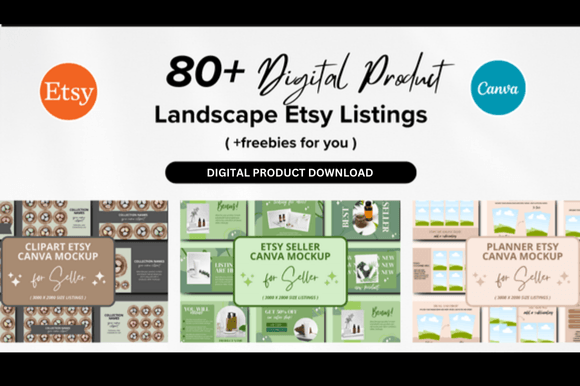
The seller says the download includes 80 Etsy listing mockups, 40 order receipts and one Etsy shop kit. That combination makes it a broader shop-graphics bundle rather than a set of listing slides alone. The listing is aimed at sellers who want to create a more consistent presentation for digital products and Etsy shop pages.
Why it stands out: The extras may be useful if you are trying to update more than one part of a shop at once. Instead of buying a listing pack and a separate order-receipt graphic, you can compare whether this combined bundle covers enough of the assets you actually need.
What to check: The listing description is brief. It does not clearly inventory all 80 layouts, identify the exact canvas dimensions or explain how the receipt and shop-kit files are organized. There are only two public reviews. Preview the full product gallery and confirm the access method before downloading; the captured page showed subscription access. A high item count is not a substitute for a clear file list.
6. Pink Store Listing Mockup Templates — a distinct visual style, but an unclear quantity

283 favorites · 5.0 from 2 reviews
Creative Fabrica listing: Pink Store Listing Mockup Templates by BellaBee Printables.
This pack uses a strong pink visual direction and is described for Etsy listing photos, digital products, printable planners, courses, ebooks, giveaways and social media posts. The seller says the templates are editable in Canva and can be customized by dropping in product photos, changing colors, adding icons and rearranging elements.
Why it stands out: A distinctive style can help a shop stand apart when it fits the product and audience. This pack may suit a brand that already uses pink or wants a brighter, more playful presentation. The product page shows a 5.0 score from two reviews.
What to check: The listing description calls it a 33-template bundle, but the more specific “You Get” section lists 15 templates at 2,700 × 2,025 px plus one bonus PDF deliverable template. That is a real discrepancy, not something to resolve by guessing. Treat the exact quantity as unclear and check the current download contents or ask the seller before purchasing. Also consider whether the strong pink look will work across your product range rather than only on one listing.
View Pink Store Listing Mockup Templates on Creative Fabrica →
4. Mockup, listing template or branding kit?
These terms are often used together in product titles, but they are not interchangeable. Knowing the difference makes it easier to avoid buying a large bundle that does not solve your actual problem.
| Resource | What it does | Best when | What it cannot do |
|---|---|---|---|
| Product mockup | Places your real product image into a scene, device, frame or lifestyle setting | You need to show scale, context or how a digital file appears on a device | It cannot prove the physical product exists or replace required real product photos |
| Listing-image template | Provides a layout for features, contents, sizes, steps and product previews | You need a repeatable sequence across many listings | It does not supply accurate product facts, photos or copy |
| Shop-branding kit | Coordinates banners, icons, receipt graphics and other shop visuals | Your storefront looks inconsistent or incomplete | It does not improve a weak product image or make a listing compliant by itself |
When a mockup is the right tool
A mockup is useful when the product is difficult to understand from a flat image alone. A digital planner can be shown open on a tablet. A printable wall-art file can be displayed in a frame, as long as the listing makes clear that the frame is only a presentation scene and is not included. A course workbook can be shown on a laptop beside a printed workbook. The product inserted into the mockup should be the same product the customer will receive.
Mockups are also useful for demonstrating variations. A seller might show the same artwork in different room settings, or a digital template in desktop and mobile views. The key is to avoid implying that a buyer receives extra products, physical accessories, devices or printed materials that are not included in the purchase.
When a listing template is more useful
A listing template is a layout system. It helps you explain what is included, show close-up details, compare sizes, describe how a digital file is delivered or walk through a product's features. It is especially helpful when you have a catalogue of related items and want each listing to follow a familiar structure.
For a digital download, the most important slides are often the real page previews, file-format information, page count, size options and a clear statement about whether the product is editable or printable. Decorative mockups can support those details, but they should not replace them.
When a shop-branding kit is the better purchase
A branding kit is a storefront tool. It can bring the banner, shop icon, order receipt banner and thank-you graphics into the same visual system. This can make a new shop look more considered, but it is not a substitute for a recognizable product range or accurate listing images. Choose a kit only after you know your shop name, color palette, product niche and the tone you want to communicate.
5. Etsy image rules: when a mockup is appropriate
This is the most important section to read before using stock mockups in an Etsy shop. Etsy's updated image guidance says that most listings need at least one unedited photo of the actual item against a real background. Other images can be edited—including with AI—provided they continue to represent the item accurately. There are specific exceptions depending on the type of product.
Handmade and physical products
For most physical items, include at least one unedited photo of the actual product. That image should show the real item against a real background. Etsy allows basic actions such as cropping, resizing, adding a watermark or changing the file format, but the required unedited photo should not be altered. Other images can be edited to adjust lighting, color or backgrounds as long as they do not make the item appear different from what the buyer receives.
A mockup can still be useful as a supporting image when it accurately shows the product in context. For example, a real handmade mug can be photographed on a kitchen counter, and additional images can show the mug in a styled scene. But a stock photo of a generic mug with your artwork pasted onto it is not a replacement for the real, unedited photo required for most physical-product listings.
Print-on-demand products
Etsy's help guidance says that if a production partner prints your original design on a standard base product, such as a shirt or mug, you may use a stock photo mockup if the stock photo's owner has authorized its use. You still need to represent the product accurately and disclose your production partner where required. Do not assume that every mockup found online is licensed for Etsy or commercial use.
Keep the garment model, color, print placement and product type consistent with the actual item you offer. If the mockup shows a different shirt blank, different fit or different print size, it may create an expectation your production partner cannot meet.
Digital downloads and printable products
For digital items with a visual component—such as a planner, template, printable, clip-art set or workbook—Etsy says the listing should include a preview of the actual content buyers will receive. A device mockup can help show how the file might be used, but it should not be the only evidence of what is included. Show representative pages, design variations or a clear preview of the real files.
For example, a digital planner listing can use a tablet mockup as its main presentation image, but it should also show actual planner pages and state the file format, page size, number of pages and whether hyperlinks or fillable fields are included. A digital invitation listing should show the real invitation design, not only a staged envelope mockup.
Patterns, instructions and functional guides
If you sell a pattern, recipe, seed product or similar item where the buyer follows instructions to make something, Etsy says the listing should show at least one real, unedited photo of something made using those instructions. AI-generated images cannot be the only images used to show the finished result. This is particularly relevant to sellers who use mockup bundles to make a downloadable pattern look like a finished physical product.
AI-edited images and accurate representation
Etsy's updated guidance allows AI-assisted editing for photos other than the required unedited photo, provided the edits do not misrepresent the item. You should not use AI to hide damage, change the product's appearance or create a false expectation. Etsy also says sellers should disclose AI use where required by its policies. For a digital product, an AI-generated representative scene may be acceptable in some circumstances, but it still must not mislead buyers and does not replace a preview of the actual digital content when the item has a visual component.
The practical rule is simple: use a mockup to explain the product, not to invent a better product than the one you sell.
6. Etsy image and shop-banner sizes
Template dimensions should be checked against Etsy's current guidance before you edit a whole pack. Etsy's help center recommends listing images with a width and height of at least 2,000 pixels. It also says the first listing photo should be at least 635 pixels in width and height to avoid being shown lower in search. These are platform recommendations, not a guarantee that one square canvas will fit every crop or placement.
| Image type | Etsy guidance | What to check in a template |
|---|---|---|
| Listing photos | Recommended width and height: 2,000 px or more | Check resolution, crop, text size and whether the product remains clear in thumbnail views |
| First listing photo | At least 635 px wide and 635 px high to avoid lower search display | Use a clear landscape or square composition with the main subject easy to recognize |
| Shop logo | Recommended 500 × 500 px | Keep the mark simple enough to read at a small size |
| Mini shop banner | Minimum 1,200 × 160 px; recommended 1,600 × 213 px | Keep text and key details away from edges |
| Big shop banner | Minimum 1,200 × 300 px; recommended 1,600 × 400 px | Check the full layout on desktop and mobile |
| Order receipt banner | Minimum 760 × 100 px | Use a short thank-you message and avoid small text |
Etsy also lists supported image formats including JPG, GIF, PNG, SVG and HEIC. Transparent PNG areas can appear black on Etsy, and animated GIF files are not supported as shop images. The platform recommends keeping the first image landscape or square because it affects thumbnail cropping. If you resize a smaller image upward, you may lose sharpness; start with a high-resolution original instead of enlarging a low-resolution preview.
Some Creative Fabrica products in this comparison use 2,000 × 2,000 px square listing layouts. That can be convenient for a reusable slide system, but it is not a universal Etsy requirement. Check the crop tool and preview the listing thumbnail before publishing. A template that looks balanced on a large monitor can become difficult to read in a small search thumbnail.
7. How to build a useful listing-image sequence
A listing-image bundle is most valuable when it helps you answer the questions a shopper would naturally ask. You do not need to use every layout in the download. A smaller, accurate sequence is better than ten decorative slides that repeat the same information.
- Lead with the clearest product image. Show the item or the actual digital product in a way that is immediately understandable. For physical goods, make sure the listing also includes the required unedited real photo. For digital downloads, include an actual content preview.
- Show what is included. Use a simple contents slide to list the files, pages, sizes, formats, variations or components. Do not count mockup devices or decorative props as part of the purchase.
- Show a close-up or detail. Zoom in on material, print quality, layout details, a page section or an important design feature. For digital products, this is a good place to show real pages at a readable scale.
- Explain size and compatibility. State dimensions, file types, software requirements, paper sizes, device compatibility or other details that could affect whether the product works for the buyer.
- Demonstrate a realistic use case. A mockup can show a printable on a desk or a planner on a tablet. Make it clear what is included and what is only a presentation prop.
- Explain the delivery process. For instant downloads, tell buyers whether they receive PDF, PNG, JPG, SVG, ZIP or a Canva link, and whether any software or account is needed.
- Close with a useful reminder. Include a concise note about personalization, printing, color variation, license terms or what is not included—only when it is relevant to the item.
For a physical product, the first photo should not be replaced by a mockup that hides its real appearance. For a digital product, a device mockup should not hide the actual pages or files. In both cases, the best sequence reduces uncertainty rather than simply adding visual decoration.
8. Canva links, file formats and editing checks
Many Creative Fabrica templates are delivered through a PDF that contains a Canva link. The PDF is often an instruction or access document; it is not necessarily the editable design itself. A JPG or PNG export is a finished image, while a Canva template link should open a design that can be copied and edited in your Canva account, subject to the creator's sharing settings and any premium elements in the design.
What the common file types mean
- Canva template link: Opens the editable layout. Make a copy in your own account before changing it, and keep the original link for reference.
- PDF access sheet: Often contains the Canva link and instructions. Open the PDF and follow the link rather than assuming the PDF itself is the template.
- PNG or JPG: Flattened image exports. They are useful for uploading to Etsy, but the individual text and design elements are not editable in the exported image.
- PDF for print: Useful for multi-page or print-ready files. Check the page dimensions, color, margins and whether the PDF is intended as a buyer download or a listing preview.
- MP4: A video export that can be used to demonstrate a product, provided it follows Etsy's current listing-video requirements and accurately represents the item.
Test the template before making a full shop set
- Download the access PDF and locate the Canva link.
- Open the link in a desktop browser and confirm that the design loads.
- Create your own copy rather than editing the creator's original design.
- Replace one photo, one heading and one background color.
- Check whether any element, font, shadow or photo effect is marked Pro.
- Export one test image and inspect the size, quality and crop.
- Check the result on a phone-sized screen before using the same layout for more listings.
This short test can catch broken links, locked elements and premium-content prompts before you spend time customizing an entire bundle. It also helps you decide whether the pack is genuinely faster than creating a simple layout yourself.
9. Commercial use, client work and resale rights
“Commercial license included” does not mean you can resell the original Canva template or pass the downloaded source files to another person. Creative Fabrica's Single Sales License and Subscription License are version 1.6, valid from April 10, 2026. Both allow certain commercial uses and digital end products, but both prohibit reselling, sublicensing, sharing or redistributing the downloaded digital files.
For digital end products, Creative Fabrica says the new product must have distinctive new features and must not compete with the original asset. The final digital product must be flattened so that customers cannot extract the original design. Simply changing the color or size of a downloaded template, or bundling several downloads together, is not enough to turn the original files into a new product.
Using a template in your own Etsy shop
Using a licensed template to create your own listing graphics or shop visuals is different from selling the template itself. You are using the layout to present your own products. You still need to check the applicable Creative Fabrica license, the rights to any included photos or Canva elements, and Etsy's rules for accurate listing images. Save the license version and product receipt with your project files.
Creating work for a client
If you are a designer or virtual assistant creating finished listing images for a client, do not assume that a commercial-use label automatically allows you to transfer the original Canva source files or share the downloaded template with multiple clients. The right to create a finished design and the right to distribute source assets are different. Check the current license and the terms of any Canva content used in the final design.
Selling editable templates of your own
If your business is to sell Canva templates, editable listing kits or mockup bundles, do not use a downloaded Creative Fabrica template as the product you resell. The license does not permit redistributing the original files. Build a genuinely new design with your own original structure and content, and make sure any third-party assets are licensed for the specific end product. If the licensing situation is unclear, ask Creative Fabrica for written clarification before listing the product for sale.
The same caution applies to “PLR,” “MRR” or “resell rights” wording in a product description. A seller's marketing phrase does not automatically override the platform's license. Confirm the exact written license that applies to the file you are downloading.
10. A pre-download checklist
- Use case: Do you need product scenes, listing layouts, a storefront banner, shop icons or all of them?
- Product type: Is your shop selling physical handmade goods, POD products, digital downloads or a mix?
- Policy fit: Will the mockup comply with Etsy's current image rules for that product type?
- Actual preview: If you sell a visual digital download, does the listing plan include a preview of the real content?
- Photo rights: Are the included mockup photos licensed for the way you intend to use them?
- Dimensions: Are the listing-image, banner, icon and receipt sizes stated clearly?
- Editable access: Does the download include a working Canva link, or only flattened PNG/JPG files?
- Canva plan: Are there Pro elements, fonts, photo effects or other paid features in the layouts?
- Inventory: Does the stated template count match the specific “included files” list?
- Access model: Is the item a single purchase, a subscription download or part of a free-trial offer?
- Reviews: How many reviews support the rating, and do any buyers mention access or export problems?
- License: Does the current Creative Fabrica and Canva license permit the exact use you have in mind?
Choose the smallest pack that solves the problem you have now. If your shop needs consistent listing slides, a focused template set may be enough. If you need a new storefront identity, buy a branding kit. If you sell digital products that need to be shown on devices or in real-world settings, a mockup bundle may be the better fit. There is little value in paying for hundreds of layouts you will never use.
11. Etsy mockup and listing-template FAQs
Can I use mockups in Etsy listings?
It depends on what you sell. Etsy's help guidance allows authorized stock-photo mockups for certain print-on-demand products, but most physical-product listings need at least one unedited photo of the actual item. For digital downloads with a visual component, include a preview of the real content buyers receive. Always make sure every image accurately represents the item.
Can I use a stock mockup for a handmade product?
Do not assume so. Etsy's general seller policy calls for your own photographs or video, with limited exceptions. For most physical items, include at least one unedited photo of the actual product. Use mockups only as supporting visuals when they are permitted and do not misrepresent the item.
What size should Etsy listing images be?
Etsy recommends listing images with a width and height of at least 2,000 pixels. The first listing photo should be at least 635 pixels wide and high to avoid being shown lower in search. Etsy also recommends a landscape or square first image because it affects thumbnail cropping. Check the current Help Center before creating a large batch of images.
Do I need Canva Pro to edit Etsy listing templates?
Not always. Some Creative Fabrica sellers say their templates work with Canva Free. However, a design may contain Pro photos, effects or other premium elements that require a paid plan or replacement. Check the exact pages you intend to export instead of relying only on the product title.
What is the difference between an Etsy mockup and an Etsy listing template?
A mockup places your product image into a scene or frame, such as a tablet, notebook or styled workspace. A listing template is a layout for presenting information such as features, sizes, contents and previews. Some bundles include both, but check the included-file list to see what is actually supplied.
Can I resell a Canva template downloaded from Creative Fabrica?
Do not assume that you can. Creative Fabrica's standard Single Sales and Subscription Licenses prohibit reselling or redistributing downloaded source files. A digital end product must be sufficiently new, must not compete with the original asset and must be flattened so the original design cannot be extracted. Read the current license before selling a template or source file.
How many listing photos should I create?
Use enough images to answer the buyer's main questions without repeating the same message. A useful sequence often includes a clear main image, contents or features, close-up details, size or compatibility information, a realistic use case and delivery details. Etsy's listing form currently allows up to 20 photos and two short videos, but the number you need depends on the product.
Should I buy a large Etsy mockup bundle or a smaller template set?
Choose based on the number of product types and layouts you actually need. A small shop with a few digital products may be better served by a focused 20-template set. A larger catalogue may benefit from a broader library. Check the file inventory, premium elements, dimensions, access method and reviews before choosing by quantity.
For a workspace to organize shop launches, content, client work and business records, see our guide to Notion templates for small business.
If you are building a broader digital-resource workflow, see our guide to Canva business templates and social media kits for brand and social content layouts, and our guide to Canva planner templates and printable planners for printable and digital planning files. For creative assets used inside your products, see how to choose SVG files for Cricut.
If you are planning to make physical products with licensed artwork, see our Vintage Flowers Sublimation Bundle guide for file, print and licensing checks.