
Floral artwork is easy to find, but a useful sublimation file needs the right size, resolution and background—not just a pretty preview. The Vintage Flowers Sublimation Bundle by Lazy Cat is listed as eight PNG files at 300 DPI, sized at 12 × 12 inches, with transparent backgrounds. The designs are described for sublimation products, cards, framed art, scrapbooks, T-shirts, pillows, bags, mugs and stickers. This guide explains what those specifications mean, how to prepare the artwork for print, which blanks work with standard sublimation, and what to know about the product's subscription-only access.
Affiliate disclosure: This article contains affiliate links. TestedWise may earn a commission if you purchase through them, at no additional cost to you. Read the full disclosure.
Some links in this guide are affiliate links. If you make a purchase or download through them, TestedWise may earn a commission at no additional cost to you. Product specifications, access options and review figures below are based on the Creative Fabrica listing viewed on November 17, 2026. We have not downloaded or printed the files, so the article distinguishes the seller's stated specifications from practical printing guidance and does not claim hands-on print results.
1. What is included in the Vintage Flowers bundle?
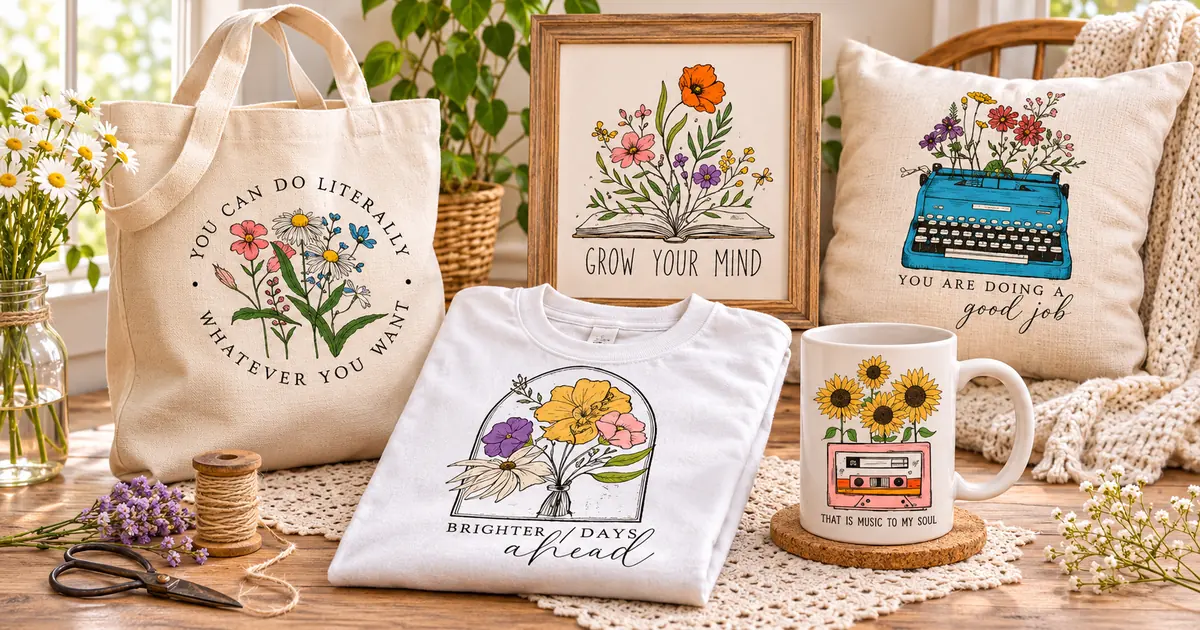
The Creative Fabrica product is titled Vintage Flowers Sublimation Bundle and is published by Lazy Cat. The listing says buyers receive eight PNG files at 300 DPI, sized at 12 × 12 inches, with transparent backgrounds. It describes the artwork as clip art for a range of creative projects, including sublimation products, cards, framed artwork, scrapbooks, T-shirts, pillows, bags, mugs and stickers.
| Listing detail | What is stated | Why it matters |
|---|---|---|
| Number of files | 8 PNG files | A compact set of eight individual images, not a large multi-format pack |
| Resolution | 300 DPI | Designed for print workflows; confirm actual pixel dimensions after downloading |
| Stated size | 12 × 12 inches | Gives a nominal maximum print canvas at the listed resolution |
| Background | Transparent | Allows the artwork to sit over a blank or chosen background in an editor |
| Format | PNG | Raster artwork; no SVG or DXF cut-file format is listed |
| Creator | Lazy Cat | Check the live listing for current previews and updates |
| Marketplace rating | 5.0 from 40 reviews | Positive customer feedback, not an independent print test |
The product preview shows a vintage floral direction with hand-drawn botanical artwork and decorative compositions. The listing does not provide a detailed name or subject inventory for each of the eight PNGs, so check the current gallery if you need a particular flower, color palette or quote-based design.
One practical detail is easy to miss: this is a PNG bundle, not a set of vector cut files. If you want editable cut paths for Cricut or Silhouette, look for SVG or DXF files instead. PNG is a good fit for full-color printing and many sublimation workflows, but it does not provide the same scalable path structure as an SVG.
View Vintage Flowers Sublimation Bundle on Creative Fabrica →
2. What do 300 DPI and 12 × 12 inches mean?
Resolution is one of the most important details in a sublimation download because the design has to be printed at a size that the image can support. DPI means dots per inch in a print context. The listing states 300 DPI at 12 × 12 inches. If the file's pixel dimensions match those stated values, the expected canvas is 3,600 × 3,600 pixels: 12 inches multiplied by 300 pixels per inch on each side.
That is a useful print size for many small craft blanks, but it is not a promise that every design can be enlarged indefinitely. If you stretch a 12-inch file to 18 inches without adding pixels, the effective resolution falls. The image may still look acceptable on some products, but fine linework can soften. Check the actual pixel dimensions in your image editor after unzipping rather than relying only on the DPI label.
| Final print size | Approximate effective resolution from a 3,600 px image | Practical note |
|---|---|---|
| 6 × 6 in | 600 DPI | Smaller prints have plenty of pixel detail, assuming the source is truly 3,600 px square |
| 9 × 9 in | 400 DPI | Useful for many small apparel or craft placements |
| 12 × 12 in | 300 DPI | The listing's stated print size |
| 15 × 15 in | 240 DPI | May still work, but inspect fine details and test the actual print |
| 18 × 18 in | 200 DPI | Enlargement reduces effective resolution; avoid assuming small details will remain crisp |
The calculation above is a guide, not a substitute for checking the files. Some programs display DPI metadata separately from pixel dimensions. The pixel count determines how much image information is available; the DPI setting tells the software how large to print that information.
3. What can you make with vintage floral PNGs?
The seller lists several possible uses. The best project depends on whether you are printing onto a sublimation blank, making a paper craft or using the image in a separate design workflow.
1. Floral T-shirts
A vintage floral image can work as a chest graphic, a small pocket-area accent or a larger front design. For standard sublimation, choose a white or light-colored polyester garment or a fabric blend with enough polyester to accept the dye. Standard sublimation does not print white ink, so pale or white areas in the artwork take on the color of the blank underneath.
2. Mugs and tumblers
Floral artwork is a natural fit for drinkware, but the blank has to be designed for sublimation. A ceramic mug needs a suitable polymer coating; an ordinary uncoated mug will not accept standard sublimation ink in the same way. Tumblers also need a compatible coating and a press or oven workflow recommended for that specific blank.
3. Tote bags and pouches
For a tote, check the fiber content before designing the print. A white or light polyester tote is a straightforward choice for standard sublimation. A cotton canvas bag needs a different transfer process or a suitable sublimation-compatible transfer product; do not assume that a PNG file alone makes cotton compatible.
4. Pillow covers and home décor
The listing specifically mentions pillows and framed artwork. A floral design can work as a centered cushion motif or a framed print. For a sublimated pillow cover, confirm the fabric is compatible and that the design area fits the press. For a paper print or framed poster, use a normal print workflow rather than a sublimation transfer unless the substrate is made for sublimation.
5. Cards, scrapbooks and stickers
These projects do not necessarily need a heat press. A transparent PNG can be placed on a page layout, layered over a colored background or printed on suitable sticker paper. The transparent area lets the page or substrate show through. Check whether the printer and sticker material support the finish you want.
4. How standard sublimation works—and which blanks to use
Standard dye sublimation is a transfer process. The design is printed onto sublimation transfer paper with sublimation ink, then heat and pressure move the dye into a compatible surface. On fabric, that usually means polyester; on hard goods, it means a surface with a polymer coating. Epson's maker guide explains that polyester or polyester-coated goods are the intended substrates and recommends white or light-colored polyester for the best results.
This is why the blank matters just as much as the PNG. A high-resolution image cannot make an unsuitable surface accept sublimation ink.
| Blank | Suitable for standard sublimation? | What to check |
|---|---|---|
| White or light polyester shirt | Yes | Check fiber content and garment heat limits |
| Polyester tote bag | Yes | Choose a sublimation-ready fabric and flat press area |
| Polyester pillow cover | Yes | Check size, seams and press clearance |
| Polymer-coated mug | Yes | Use a mug specifically sold for sublimation |
| Polymer-coated tumbler | Yes | Confirm coating and the correct press or oven method |
| Plain cotton T-shirt | No, not with standard sublimation alone | Use a different transfer system or suitable sublimation HTV |
| Uncoated ceramic mug | No | Use a sublimation-coated blank or another decoration method |
For standard sublimation, dark garments are also a problem because the process does not add white ink. A pale flower or white petal area cannot print as white on a colored shirt; it will show the color of the blank. This is one reason light-colored blanks are usually the safest choice for floral artwork with pale highlights.
If you want to decorate cotton or dark garments, do not try to solve the problem by changing the PNG. You need a different process, such as a compatible heat-transfer vinyl or another transfer system. Sawgrass and Epson both distinguish standard sublimation from other methods designed for additional materials.
5. A practical workflow from PNG to finished product
The product page says you will need a computer to unzip the files and a design or editing program that supports PNG or JPG. That is a sensible starting point: extract the files, check the artwork, then prepare a separate layout for the blank you are actually decorating.
- Download and unzip the bundle. Save the ZIP to a computer and extract it. Keep the original ZIP as a backup rather than working directly from a compressed archive.
- Check all eight files. Open each PNG and confirm that it displays correctly. Inspect the transparent background, pixel dimensions and orientation. Do not assume all files are identical in size just because the listing gives one general specification.
- Choose the blank before sizing the design. Measure the printable area on the shirt, tote, mug or tumbler. Leave room for seams, handles, curves and the edges of the press area.
- Create a canvas at the final print size. Add the PNG to your design software, preserve its proportions and position it on the canvas. Avoid stretching the image to fill a shape if the proportions do not match.
- Check the background and edges. A transparent PNG should allow the blank or the chosen background to show through. Zoom in to look for stray pixels, unwanted halos or edges that could become visible after pressing.
- Set up the print file. Use the printer's recommended color settings and sublimation transfer paper. For workflows where the printed transfer is placed face-down, mirror the artwork before printing; check your software and blank instructions so you do not mirror it twice.
- Prepare the blank. Make sure it is clean, dry and suitable for sublimation. Remove lint from fabric and use the heat-resistant tape or protective paper recommended for the product.
- Press according to the blank maker's instructions. Time, temperature and pressure vary by substrate, coating, press and transfer method. Do not apply one generic setting to every mug, shirt or tumbler.
- Inspect the result. Check for ghosting, uneven color, missing edges or a shifted transfer. Make a test with an inexpensive blank before producing a batch for sale.
Sawgrass publishes starting-point heat-press settings for several substrates, but its own guidance stresses that quality depends on the blank, press calibration, color management, manufacturer instructions and testing. Use the exact blank manufacturer's settings whenever they are available.
6. Color, transparency and print-quality checks
The Creative Fabrica listing includes two useful cautions: actual colors may vary slightly because of monitor settings, and the printing method can affect the final color and quality. Those notes matter with vintage floral artwork, where pale petals, muted greens and warm neutrals can look quite different on a bright monitor than they do on a printed object.
- Do not judge color from the screen alone. A monitor is not a reliable proof of the final transfer. Print a small sample on the actual paper and printer you plan to use.
- Check the transparent areas. Transparent parts should reveal the blank or the background in your design software. If a white box appears, confirm whether the file is truly transparent and whether the editor is displaying transparency correctly.
- Preserve the aspect ratio. Stretching a flower can distort petals and leaves. Resize proportionally and reposition the design instead.
- Use a suitable blank color. Standard sublimation does not print white. Light-colored blanks usually preserve the intended look of pale flowers and highlights better.
- Keep the print area realistic. A 12-inch square file is not automatically suitable for every mug or tumbler. Wrap dimensions and printable areas vary by blank.
- Test before making inventory. A single test print can reveal whether your chosen printer, paper, ink and blank produce the color and sharpness you expect.
Because the download is described as PNG artwork, you can use it in many editors that accept PNG files. You do not need a specialized sublimation file extension. What matters is the image's pixel quality, the final print size, and the compatibility of your printer, ink, transfer paper and blank.
7. Commercial use, POD and subscription rules
The product page says the bundle includes a commercial license. Creative Fabrica's current license pages explain that downloaded graphics can be used in certain physical end products and that the original files cannot be resold, shared or redistributed. Digital end products must be genuinely new, must not compete with the original resource, and must be flattened so customers cannot extract the source artwork.
There is an important distinction for this particular listing: at the time of review, the product page said it was available only as part of a subscription. Creative Fabrica has a separate Subscription License, so check that version rather than relying on a general statement that “commercial use is allowed.” The current subscription terms allow physical end products to be sold, but they restrict sharing the original PNG files and set conditions for continuing to create or sell products after a subscription ends.
The current license also describes Full POD rights for non-needlework downloads made on or after April 25, 2026. However, it places restrictions on continuing to sell unmodified Full POD files after a subscription ends. The license has a specific exception for assets designated as craft files, but buyers should not assume a product qualifies without checking its category and the exact terms attached to the download.
For a small shop, the safe approach is simple:
- Sell a finished physical item such as a compatible mug, shirt, tote or pillow—not the original PNG file.
- Do not send the original high-resolution PNGs to a customer as a downloadable bonus.
- Do not upload the eight PNGs as a new digital flower bundle or a competing clip-art pack.
- For digital end products, add meaningful original design work and flatten the final file so the source art cannot be extracted.
- If you use a subscription, save a copy of the license terms and check what happens if you later cancel.
Read the Creative Fabrica Subscription License and the Single Sales License for the latest rules. This article summarizes the public terms for practical planning and is not legal advice.
8. Subscription access and customer feedback
Unlike the Magic and Celestial SVG Bundle, the Vintage Flowers page currently states that the product is available only as part of a subscription. The page also displays a promotion for 10 free downloads through a free trial. That is not the same as a standalone no-trial download: the access route shown is tied to the subscription offer. Check the current trial length, renewal price, cancellation terms and download eligibility before starting.
The listing showed a 5.0 score from 40 reviews when checked on November 17, 2026. Visible verified-purchaser comments were positive, with several customers describing the designs as lovely or expressing satisfaction with the artwork. That feedback is encouraging, but the review count is still a marketplace signal rather than a controlled print-quality test. We have not printed the files or checked them on a specific sublimation printer.
Before you subscribe, make sure the product is a fit for the way you work. If you only need one floral image for a one-off project, a subscription may not be the best value. If you regularly use Creative Fabrica resources, the broader library may be more relevant—but compare the total subscription cost with the number of assets you expect to use.
9. Who should choose this bundle?
A good fit: crafters who want vintage floral PNG artwork for sublimation-ready blanks, print projects, cards, scrapbooks, framed art and personalized gifts; makers who prefer transparent raster files over vector cut paths; and small shops that understand the difference between a licensed finished product and redistributing source artwork.
Less suitable if: you need SVG or DXF cut paths; you need more than eight designs; you need a standalone no-subscription download; you plan to print on ordinary cotton or uncoated drinkware using standard sublimation; or you need a guaranteed color match without test printing.
If you want to compare other sublimation artwork, see our Retro Christmas Sublimation Bundle guide and guide to free Christmas sublimation PNGs. If your project is based on cut paths rather than full-color PNG printing, our Magic and Celestial SVG Bundle guide explains the Cricut and Silhouette workflow.
10. Vintage Flowers Sublimation Bundle FAQs
How many files are included?
The listing states that the bundle contains eight PNG files. It does not list SVG, DXF or EPS formats.
What size and resolution are the PNG files?
The product page states 300 DPI and 12 × 12 inches. If the pixel dimensions match that specification, the expected image size is 3,600 × 3,600 pixels. Check the actual files after downloading.
Do the files have transparent backgrounds?
Yes. The listing specifically says the eight PNG files have transparent backgrounds. Check the extracted files in your editor to confirm that transparency displays correctly.
Can I use these designs on mugs and tumblers?
The listing includes mugs among its suggested uses. For standard sublimation, use a blank with a suitable polymer coating and follow the blank maker's pressing instructions. An ordinary uncoated mug is not a standard sublimation blank.
Can I sublimate the flowers onto a cotton T-shirt?
Not with standard sublimation alone. Standard dye sublimation bonds to polyester fibers or polymer-coated surfaces. For cotton, you need a different transfer method or a compatible product such as sublimation HTV; follow that system's instructions.
Can I use the PNG files in Canva or another design editor?
The listing says a computer and a design or editing program that supports PNG or JPG are needed. A program that imports PNG files can generally place the artwork on a canvas, but the exact features available for resizing, color management and print preparation depend on the software.
Is the bundle free to download without a subscription?
At the time of review, the product page said it was only available as part of a subscription and displayed a 10-download free-trial offer. It was not presented as a standalone no-trial freebie. Check the live listing and subscription terms before proceeding.
Can I sell products made with these flowers?
The product page says a commercial license is included. Creative Fabrica's subscription license allows certain physical end products to be sold but prohibits redistributing the original PNG files. POD and post-cancellation rules have additional conditions, so read the current license attached to your download.
If you are building a wider digital craft workflow, our Etsy mockups and listing templates guide explains how to present finished products online. For a different type of file, see the Magic and Celestial SVG Bundle guide.