
A planner download can mean several different things: an editable Canva design, a finished PDF you print at home, a digital planner you use on a tablet, or an interior template intended for Amazon KDP. They may look similar in a product preview, but they do not work the same way. Before choosing a Canva planner template or printable planner, check what you actually receive, whether the pages can be edited, which paper sizes are included, and whether the file is ready to print or still needs layout work.
Affiliate disclosure: This article contains affiliate links. TestedWise may earn a commission if you purchase through them, at no additional cost to you. Read the full disclosure.
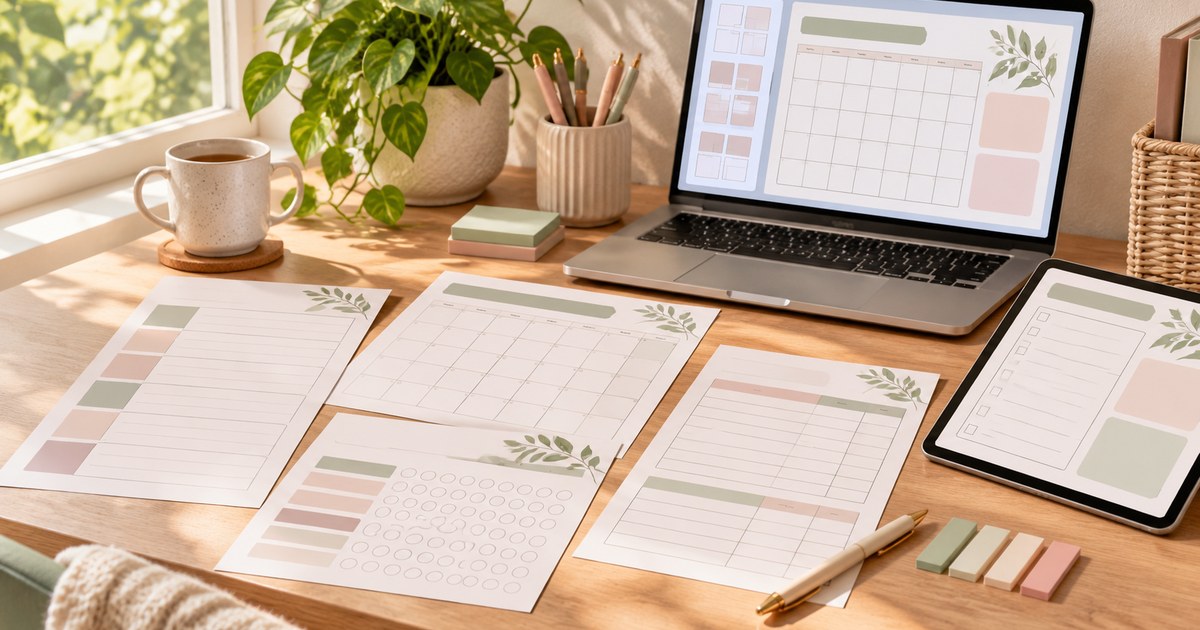
This guide compares six Creative Fabrica planner downloads that serve different jobs: KDP interiors, a large multi-topic digital planner bundle, simple daily and weekly pages, a personal planner insert collection, a finance-focused planner, and a small print-ready set. We reviewed the public product descriptions, visible favorite counts, ratings, review totals and stated file details. Favorites are saved-interest signals, not sales or download totals. TestedWise has not downloaded, edited, printed or published these products, so the product notes below are based on the live listings rather than hands-on testing.
1. Six popular Canva and printable planner downloads at a glance
The products below are ordered by the favorite counts visible on their Creative Fabrica pages during this research session. A favorite means a member saved the listing; it does not tell us how many people bought or downloaded it. Ratings are shown with their review counts because a five-star average from one review is a much smaller signal than a similar score from more than one hundred reviews.
| Creative Fabrica listing | Favorites* | Public rating | What the listing specifies | Best fit |
|---|---|---|---|---|
| 100+ Editable Templates | KDP 2027 | 16,730 | 4.9 / 144 | 100+ editable 2027 Canva templates across planners, journals, trackers and logbooks | KDP creators who want a broad starting library |
| Best Selling Digital Planner Bundle | 2,188 | 4.6 / 11 | 1,100+ pages, editable Canva links, PDF/JPEG/PNG; 8.5 × 11 in, no bleed | People who want many planner themes in one bundle |
| Elegant Canva Planner Templates | 1,407 | 5.0 / 12 | Three editable pages: weekly planner, daily planner and to-do list | A simple, low-clutter weekly routine |
| Personal Planner Canva Templates | 358 | No reviews shown | 46 Canva templates in A4 and US Letter; designed to be printed and filled in by hand | Personal planner inserts and household organization |
| Finance & Budget Planner Canva Template | 276 | 5.0 / 1 | Monthly budgets, paycheck plans, debt, savings, bills and expense trackers | Budgeting and financial organization |
| Printable Planner & Notepad Template Set | 139 | 5.0 / 1 | Eight JPG, PNG and PDF files; A4; 300 DPI | Simple print-and-write planning pages |
*Favorite counts, ratings and review totals are a dated snapshot of the public Creative Fabrica pages checked on November 17, 2026. They can change. They are not sales figures, download totals or independent quality scores. Where a listing does not state a page size, file type or page count, this guide does not assume one.
2. How the shortlist was selected
Creative Fabrica’s Best Selling Planner tag and Planners & Schedules category contain a mix of personal planners, business organizers, printable inserts and KDP interiors. The highest-interest listings are not all aimed at the same buyer. Some are small sets for everyday use; others are large libraries designed for people who want to create their own journals or low-content books.
That distinction matters. A 1,100-page bundle may look like better value than a three-page daily planner, but most people do not need hundreds of unrelated worksheets. Likewise, a KDP interior pack can be useful to a publisher while being awkward for someone who only wants a weekly sheet to print and put on the fridge.
We selected products with clearly different uses and compared them using the details the seller actually states: favorite count, rating and review count, editable Canva access, file types, page dimensions, page quantity and intended workflow. If a product page leaves a practical question unanswered, that is treated as a reason to check before downloading—not a detail to fill in by guesswork.
3. Six Creative Fabrica planner picks compared
1. 100+ Editable Templates | KDP 2027 — the strongest popularity signal for KDP creators
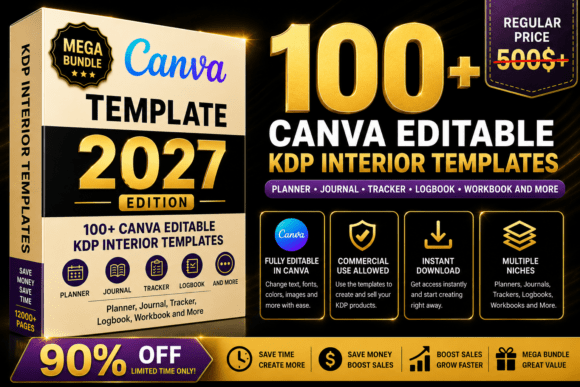
16,730 favorites · 4.9 from 144 reviews
Creative Fabrica listing: 100+ Editable Templates | KDP 2027 by Interior Creative.
This listing leads the selected group by a wide margin in visible favorites and has the largest review sample. Its description positions the download as a 2027 KDP planner and journal bundle with more than 100 editable Canva templates. The named examples cover a broad range: a 365-day planner, monthly planners, gratitude and self-love journals, budget trackers, daily planners, meal planners, fitness planners, logbooks, address books and other niche interiors.
Why it stands out: The range is useful if you are researching several low-content or guided-journal ideas rather than building one personal planner. The product description specifically says the templates can be opened in Canva and customized by changing text, colors, fonts and other editable elements. The 2027 focus also makes it more timely than older calendar-based templates.
What to check: The listing page does not clearly state the final page dimensions, bleed settings or a complete export-file list in the details reviewed for this guide. Do not treat the phrase “KDP” in the title as proof that every interior is ready to upload. Open the product preview and confirm the exact template you want, then check the trim size, margins, page count, bleed and exported PDF before submitting a book to KDP. A calendar or dated planner also needs a careful date check before publication.
View 100+ Editable Templates | KDP 2027 on Creative Fabrica →
2. Best Selling Digital Planner Bundle — the broadest all-purpose collection
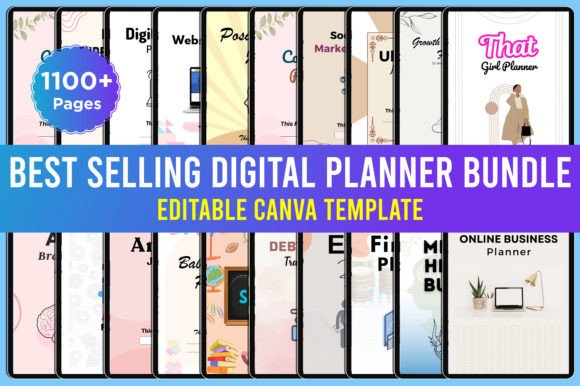
2,188 favorites · 4.6 from 11 reviews
Creative Fabrica listing: Best Selling Digital Planner Bundle by designmela01.
This is a large collection of themed planners and journals rather than one single daily planner. The listing names 21 planner entries, including a growth-mindset journal, vision board planner, ADHD brain-dump planner, anxiety journal, debt and budget tracker, event planner, finance planner, student planner, travel planner, online-business planner and social-media marketing planner. One self-confidence planner entry appears twice in the list, so the number of entries should not be mistaken for 21 completely different products.
The seller states that the download includes editable Canva links, high-quality PDF files, JPEG and PNG files, more than 1,100 pages, an 8.5 × 11-inch print dimension and no bleed.
Why it stands out: It is a practical choice for someone who wants to browse several planning systems in one download. The mix spans personal organization, study, travel, finance and online business, so it can serve as a reference library when deciding which layouts are worth keeping.
What to check: More pages do not automatically mean a more useful planner. The bundle’s 4.6 score is based on 11 reviews, and the visible review section includes a buyer who reported a download problem. Confirm that the Canva links open, make your own copy before editing, and inspect a few representative pages before relying on the entire bundle. The stated 8.5 × 11-inch size and no-bleed setup should also be checked against your intended print workflow.
View Best Selling Digital Planner Bundle on Creative Fabrica →
3. Elegant Canva Planner Templates — a focused daily and weekly set

1,407 favorites · 5.0 from 12 reviews
Creative Fabrica listing: Elegant Canva Planner Templates by katexlab.
This is a deliberately small set: one weekly planner, one daily planner and one to-do list, with PDF instructions. The seller says the pages can be customized in Canva on desktop or mobile and that a free Canva account is sufficient; Photoshop is not required.
Why it stands out: A three-page set can be easier to adopt than a large bundle. If you mainly need a place to plan the week, organize today and capture tasks, the smaller scope is an advantage. The listing also has 12 reviews behind its five-star score, a more useful sample than a rating based on a single review.
What to check: The product page reviewed here does not specify a paper size in the description. Before printing, check the page dimensions in the Canva design and confirm whether the layout suits US Letter, A4 or another size. The page is also marked as available through a Creative Fabrica subscription, so check the current access requirement in your account rather than assuming it is a one-time standalone purchase.
4. Personal Planner Canva Templates — the most clearly specified insert set
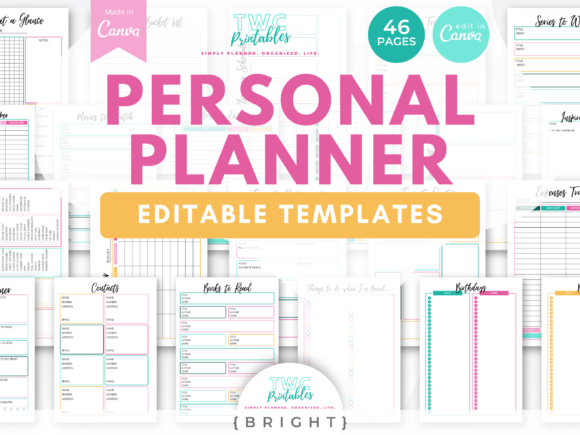
358 favorites · no public reviews shown
Creative Fabrica listing: Personal Planner Canva Templates by TWCprintables.
The seller lists 46 editable Canva templates in A4 and US Letter sizes. The pages cover daily and weekly planning, monthly to-dos, year-at-a-glance planning, expenses, habit tracking, meals, gifts, hobbies, gratitude, passwords, contacts, cleaning, groceries, birthdays and other everyday lists. A bonus PDF points to ten additional sheets available through the seller’s email sign-up.
Why it stands out: This is the clearest fit for someone who wants a flexible binder or a set of printable planner inserts. The page-size options are stated, and the range is practical: it goes beyond scheduling into household routines, personal interests and basic tracking.
What to check: The seller explicitly says these are not fillable PDFs. You cannot type directly into the boxes as delivered; the intended workflow is to edit the Canva templates and print them to fill in by hand. The seller also recommends using Canva on a desktop because the mobile app is more limited. If you need a form you can type into, this is not the same thing as a fillable PDF. The page shows no public reviews, so use the previews to judge the layout before downloading.
5. Finance & Budget Planner Canva Template — for people who need more than a monthly budget
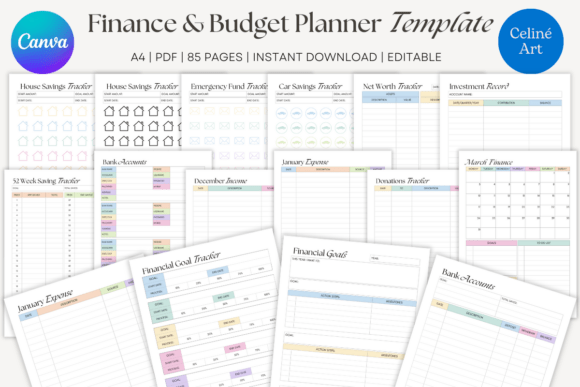
276 favorites · 5.0 from 1 review
Creative Fabrica listing: Finance & Budget Planner Canva Template by Celine Art.
The product description presents this as an all-in-one finance planner. Its listed sections include monthly budgets, paycheck budgets, a yearly financial overview, bill and subscription trackers, expense and debt trackers, sinking funds, a 52-week savings challenge, net-worth and financial-goal pages, investment and retirement logs, donation records, bank-account information, holiday budgets and a checkbook register.
Why it stands out: The content is more specific than a generic planner. If your main reason for downloading a template is to keep household spending, savings goals and recurring bills in one place, the finance-focused layout is more relevant than a broad productivity bundle.
What to check: The page describes Canva editing with a free account and says the planner can be used digitally or printed, but the reviewed description does not state a complete page count or exact paper dimensions. It also has only one public review, so the five-star score is a very small sample. Check the preview for the actual fields and make sure the layout fits the way you track income, bills and savings. A planner is a record-keeping tool, not financial advice or an automatic budgeting system.
View Finance & Budget Planner Canva Template on Creative Fabrica →
6. Printable Planner & Notepad Template Set — a straightforward print-only option

139 favorites · 5.0 from 1 review
Creative Fabrica listing: Printable Planner & Notepad Template Set by artflorara.
This set is aimed at people who want pages to print rather than a Canva design to customize. The listing describes eight JPG, PNG and PDF files in A4 size at 300 DPI. The stated uses include goal setting, habit tracking, routines, memos, journaling, project planning, school scheduling and notes.
Why it stands out: The file list and page size are clear. If you are happy with the design as shown and simply want to print a few planning sheets, a ready-made PDF or image can be more convenient than opening a Canva link and editing a template.
What to check: Eight files does not necessarily mean eight complete planner systems or a large page bundle. The product page does not describe a Canva edit link, and its five-star score is based on one review. Treat it as a small printables set, not a customizable planner library. If you need US Letter, check whether the A4 files can be scaled without making writing areas too small.
View Printable Planner & Notepad Template Set on Creative Fabrica →
4. Canva template vs printable PDF vs digital planner
Before comparing colors or page counts, identify the kind of file you need. The word “digital planner” is used loosely in marketplace listings, and it does not always mean a hyperlinked planner for an iPad.
An editable Canva template
A Canva template is a design you open in Canva and customize. Depending on the seller’s file, you may be able to change headings, colors, fonts, labels, page order and decorative elements. You then export the version you want to print or use on a screen. This is the best format when the default wording or style is close to what you need but not quite right.
Look for a working Canva template link, a clear list of included pages and an indication of whether the design uses Canva Free or Pro elements. A PDF that contains a Canva link is usually an instruction or access document; it is not necessarily the editable planner itself.
A printable PDF or image set
A printable planner is usually a finished PDF, JPG or PNG. You download it, choose the correct paper size and print. It is often the simplest option for someone who wants to write by hand and does not need to change the layout. A PDF is convenient for a multi-page document because the pages stay together; JPG and PNG files can be useful when you want to place an individual page into another document or print only selected sheets.
Do not assume a PDF is fillable. A printable PDF may contain only a flat page image, with no fields you can click and type into. If you need to complete the planner on a computer, look for the words “fillable PDF” or inspect the actual file description.
A hyperlinked digital planner
A hyperlinked digital planner is generally a PDF designed for a tablet note-taking app. Tabs or index buttons take you between months, weeks, sections or notes pages. It may be printable too, but the navigation links are the feature that makes it different. A product titled “digital planner” is not automatically hyperlinked. Check that the listing explicitly mentions hyperlinks or clickable tabs and names the apps or devices it supports.
None of the six picks above is ranked as a hyperlinked planner because the selected product descriptions do not provide enough clear evidence of that feature. If clickable navigation is essential, treat it as a separate requirement and verify it in the live preview before downloading.
5. How to use an editable Canva planner template
The first edit is usually simple, but there are a few steps that prevent the most common problems.
- Download the instruction file. Many marketplace products provide a PDF containing one or more Canva links. Save that file and read the instructions before opening the design.
- Open the Canva link while signed in. Use the account you want to keep the design in. If the seller instructs you to make a copy, do that before editing so you are not changing the original shared design.
- Check the page list. Confirm that all expected pages are present. A large bundle may contain several separate planners, not one continuous document.
- Replace the sample text carefully. Change dates, headings, labels and examples. Check that longer words still fit in the boxes and that no text has been pushed outside the page margins.
- Review fonts and design elements. If an element is marked as Pro or displays a watermark, you may need a suitable Canva plan or a separate content license to export it without a watermark.
- Set the page dimensions before exporting. Choose the intended paper or book trim size first. Resizing after the layout is finished can shift text and reduce writing space.
- Export and inspect the final file. Open the downloaded PDF or image files outside Canva. Check page order, orientation, margins, text, links and the file size before printing or uploading anywhere.
Canva’s own Help Center explains that Template links let recipients view and use a design as a template. It also notes that creating a Template link is a feature for certain paid, education and nonprofit plans. That is a creator-side requirement; it does not mean every person who opens a template link must have Canva Pro. The buyer should still check whether the specific design contains premium elements.
6. Do you need Canva Free or Canva Pro?
Not always. Several of the selected Creative Fabrica listings explicitly say that their templates work with a free Canva account. That is useful, but it is not a guarantee that every asset in every planner bundle is free to export.
Canva distinguishes Free content from Pro content. Premium elements can show a watermark in a Free account, and Canva says users can remove that watermark by purchasing the relevant content license or upgrading to an eligible paid plan. A template may open and remain editable while still requiring payment or a Pro plan for one or more elements at export time.
Before downloading, look for a clear statement such as “works with Canva Free,” then check the preview for premium photos, graphics or fonts. If you want to avoid an unexpected charge, choose a template whose seller confirms that all included elements are available to Free users, or be prepared to replace premium elements with free alternatives.
Canva’s content license is separate from Creative Fabrica’s license. If a design contains Canva Pro content, the Canva license applies to that content. Canva’s terms do not allow Pro content to be copied, downloaded or distributed as a standalone item. This matters most when a template creator plans to pass a design on to other users or sell a new digital product made with Canva assets.
7. A4 vs US Letter: check the page size before printing
A4 and US Letter are close in size, but they are not interchangeable. US Letter is 8.5 × 11 inches; A4 is 210 × 297 mm. Their proportions differ, so a page designed for one size may need a small reduction or crop to fit the other.
This is why the Personal Planner Canva Templates listing is useful for buyers who need both A4 and US Letter: the seller explicitly lists both sizes. The Printable Planner & Notepad Template Set lists A4 only. The Elegant Canva Planner Templates page reviewed here does not state a paper size, so the dimensions should be checked in the Canva design before printing.
Print a test page before using the whole set
- Check the paper size selected in the printer settings.
- Use “Actual size” when the PDF is already designed for the paper you loaded and you do not want it scaled.
- Use “Fit” only when you want the page reduced or enlarged to fit the printable area. This can change the size of writing boxes and margins.
- Check whether your printer can print to the edge. Many home printers leave a non-printable border.
- Print one sample page first. Confirm that small labels are readable and that the writing areas are large enough for your handwriting.
- If you plan to use markers, test the paper and ink before printing a full stack. Inkjet ink and paper coatings can behave differently from laser printing.
Adobe Acrobat’s print settings include Fit, Actual size, Shrink oversized pages and Custom Scale. The correct choice depends on the PDF’s dimensions and the paper in your printer; “Fit” is not automatically the best setting for every planner.
8. Can you use a planner template for Amazon KDP?
Some of the products in this comparison are explicitly marketed for KDP. That makes them relevant to people publishing planners, logs or journals, but a marketplace label is not a publishing approval. KDP checks the finished interior file, not the seller’s description of the template.
Before uploading a planner interior, verify the following:
- Trim size: The finished book dimensions must match the trim size selected in KDP. An 8.5 × 11-inch template is not automatically suitable for a 6 × 9-inch book.
- Bleed: If any background, image or design element reaches the page edge, the interior must be set up with the correct bleed. A no-bleed template needs to keep its content inside the safe area.
- Margins and gutter: The inside margin depends on page count and binding. Check the current KDP margin table rather than copying a margin from another book.
- Image resolution: KDP's file guidance specifies at least 300 DPI for images. Check the actual pixel dimensions as well as the DPI label.
- Fonts and text: Review font embedding, small text, line weights and contrast. A layout that looks fine on a monitor can become hard to read in print.
- Page count and order: Remove duplicate pages, check blank pages, verify page numbering and make sure the final PDF has the correct sequence.
- Rights: Confirm that the license covers the way you intend to publish and sell the finished book. Do not upload the original editable template or pass the source files to buyers.
For a dated planner, also verify every calendar and date before publication. A template can be beautifully designed and still contain a wrong weekday, duplicated month or outdated year. KDP’s official guidance covers trim size, bleed, margins and manuscript file requirements; use the current rules and the KDP previewer for the final check.
9. Creative Fabrica licensing and commercial use
“Commercial use included” does not mean “you can resell the download.” Creative Fabrica’s Single Sales License and Subscription License allow certain personal and commercial uses, but they also prohibit redistributing the original digital files. Digital end products must be sufficiently distinct from the original asset and flattened so that buyers cannot extract the source design. Simply combining several downloaded files into a new bundle is not enough.
If you are buying a planner for personal use, keep the downloaded files in your own account and do not share the original Canva link or source files with other people. If you are creating a product for sale, read the exact license attached to your download and check that your finished planner adds meaningful new content or features. A finished, customized product is not the same as passing on the original template.
Subscription downloads and single purchases are governed by separate Creative Fabrica license documents. The subscription license also has rules about what you can continue creating after a subscription ends. Do not rely on a seller’s short “commercial license” badge as a substitute for reading the current license terms.
Canva’s own content license is another layer. If your design uses Canva Free or Pro elements, follow Canva’s rules as well as Creative Fabrica’s. In particular, do not distribute Canva Pro elements as standalone files or build a downloadable library that lets other people extract the original assets.
10. A practical checklist before downloading
Use this short checklist when comparing two planner listings that look similar in their preview images.
- Purpose: Is this for handwritten planning, digital annotation, a personal binder, a small business or KDP publishing?
- Editing: Is there an actual Canva template link, or only a PDF/JPG/PNG download?
- File types: Are the final PDF and image files included, or do you need to export them yourself?
- Page dimensions: Does it include A4, US Letter, both, or a different size?
- Fillable fields: Can you type into the PDF, or is it designed to be printed and filled in by hand?
- Page count: Does the seller list the number of unique pages, not just the number of files or formats?
- Canva access: Does the seller say Canva Free is enough? Are any Pro elements used?
- Print quality: Are resolution, bleed, margins and orientation stated?
- Commercial rights: Does the license allow the exact end product you plan to make, without redistributing the original source?
- Current details: Does the live preview still match the written description, and are any dates or calendar pages up to date?
A planner is useful when it fits the way you already organize your life. A small set of pages that you actually use can be better than a huge bundle that takes an afternoon to sort through. Choose the workflow first, then compare the design.
11. Canva planner and printable planner FAQs
Are Canva planner templates printable?
Usually, yes. An editable Canva planner can generally be exported to a PDF or image format and printed. Check the template’s page dimensions and any premium elements before exporting, then print a test page to confirm the scale and margins.
Do I need Canva Pro to edit a planner template?
Not always. Some Creative Fabrica listings explicitly say they work with Canva Free. However, a template may include Pro photos, graphics or fonts that require a separate license or an eligible paid plan when you export it. Check the product description and the design itself.
What is the difference between a printable planner and a digital planner?
A printable planner is usually a PDF or image file intended to be printed and filled in by hand. A digital planner is intended for use on a screen. Some digital planners are simple PDFs; others include hyperlinks for navigation or fields for typing. Check which features are actually included rather than relying on the title.
Is A4 the same as US Letter?
No. A4 measures 210 × 297 mm, while US Letter measures 8.5 × 11 inches. A page can be scaled to fit the other size, but that may change the writing area or leave larger margins. Choose a template that includes your preferred paper size whenever possible.
Can I type directly into a printable planner PDF?
Only if the PDF includes fillable form fields or you use a PDF editor that lets you add text. A flat printable PDF is designed to be printed and written on. Some Canva planner listings specifically say that their exported PDFs are not fillable.
Can I sell a planner made with Creative Fabrica templates?
It depends on the license and how you create the finished product. Creative Fabrica allows certain commercial end products, but prohibits redistributing the original files. Digital end products must be sufficiently distinct and flattened so the original assets cannot be extracted. Check the current Single Sales or Subscription License and Canva’s content rules before selling.
Are KDP planner templates ready to publish?
Not automatically. Even if a listing says “KDP ready,” check the trim size, bleed, margins, page count, image resolution, font handling and page order. Upload the finished manuscript to KDP and review it in the previewer before submitting the book for publication.
Which file format is best for a printable planner?
PDF is usually the easiest format for a multi-page planner because it preserves page order and dimensions. JPG and PNG files are useful for individual pages or when you want to place a page into another design. A Canva link is the better starting point when you need to change the layout before exporting.
For business owners who need coordinated branding and social content, see our guide to Canva business templates and social media kits.
If you are comparing other kinds of creative downloads, see our guides to printable coloring pages for adults and machine embroidery designs and file formats. For a different kind of printable organizer, our reading journal and book tracker guide explains printable, fillable and digital formats.