
A machine embroidery design is more than a picture you can print or resize. It is a set of stitch instructions prepared for an embroidery machine, and the right download has to match your machine, hoop, fabric and project. Before choosing a popular design, check the exact file format, finished dimensions, stitch count and included sizes. A listing with ten file extensions is not automatically compatible with every machine, and a large bundle is not useful if its smallest hoop requirement is bigger than the frame you own.
Affiliate disclosure: This article contains affiliate links. TestedWise may earn a commission if you purchase through them, at no additional cost to you. Read the full disclosure.
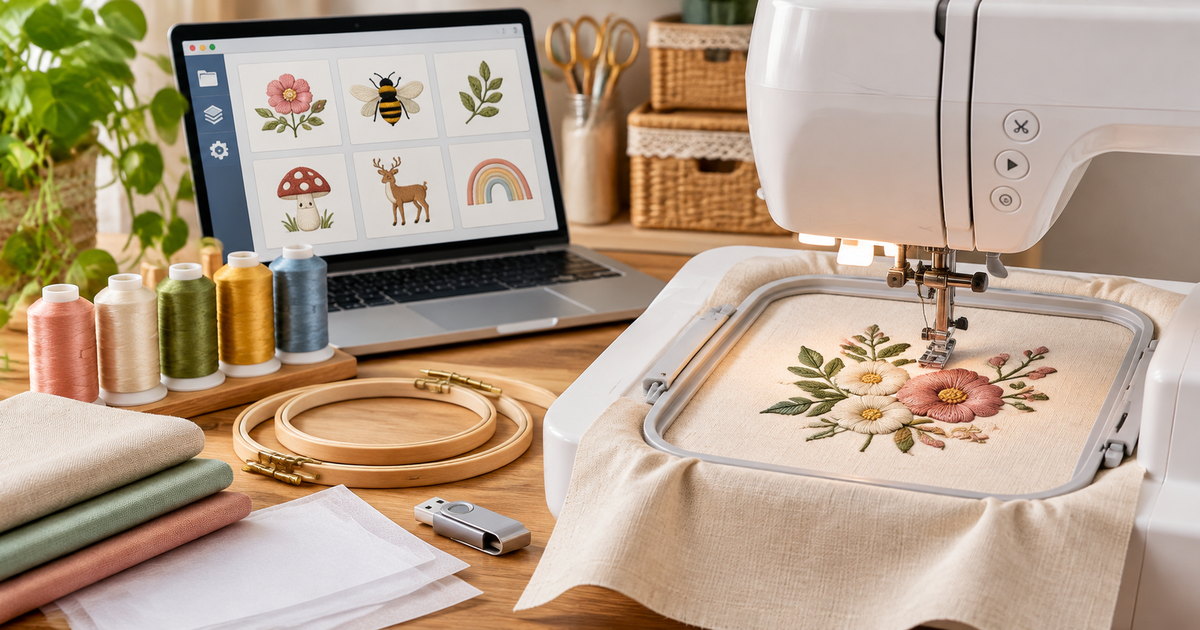
This guide is for home embroiderers and small creative businesses comparing digital machine embroidery files. It explains common formats, hoop measurements, stitch counts, stabilizers and licensing, then compares six Creative Fabrica listings selected for their visible popularity and different project uses. These are digital downloads, not finished patches or physical embroidery. TestedWise has not downloaded, edited or stitched out the files; product details below are based on public listing information and platform documentation.
1. Six popular machine embroidery designs at a glance
These six listings cover several common reasons to buy embroidery files: personalized tags, small decorative motifs, quilting blocks, school-themed projects, applique-style artwork and holiday gifts. They are ordered by the favorite counts visible on their Creative Fabrica product pages during this research snapshot. The counts can change and should not be read as sales totals.
| Creative Fabrica listing | Visible favorites* | What the page specifies | Best fit | Main check before download |
|---|---|---|---|---|
| Personalized Name Tag Embroidery Bundle | 355 | 10 tag styles, 3 sizes each, 30 files | Backpacks, luggage tags, gifts and labels | Format badges and written format list do not fully match |
| Sewing Machine and Tools | 166 | 3.51 × 3.34 in; 14,747 stitches; 4 × 4 hoop; 8 colors | A sewing-themed accent for fabric projects | One design, not a sewing-themed bundle |
| Quilt Block Machine Embroidery | 96 | Square sizes from 4 to 9 in; one color in the displayed sewing details | Quilt blocks, pillowcases and table linens | Choose a size that fits your actual hoop |
| Back to School Embroidery Design Bundle | 70 | School icons; multiple machine formats and several hoop sizes | Teacher gifts, pencil cases and school accessories | The listing does not state one simple total file count |
| Woman Embroidery Design | 54 | 3.51 × 3.05 in; 12,149 stitches; 4 × 4 hoop; 10 formats stated | Clothing, bags and applique-style projects | The page says five sizes but shows one detailed size entry |
| Christmas Embroidery Design Bundle | 50 | 23 designs; varied dimensions and hoop requirements | Holiday clothing, towels, stockings and décor | Do not assume every design uses a 4 × 4 hoop |
*Favorite counts are a public-page snapshot captured during the November 17, 2026 research session. They are not downloads, sales, review totals or a measure of stitch-out quality. The product pages can change. Where a listing’s format badges, description and sewing details differ, the discrepancy is called out rather than silently resolved.
2. How the CF shortlist was selected
Creative Fabrica’s Embroidery category describes itself as a library for machine embroidery and displayed more than 157,000 designs during this research session. Its “Popular embroidery designs” area was strongly seasonal, with many Christmas motifs and gift projects visible near the top of the category page. That is a useful signal for holiday demand, but a seasonal ranking is not the same as an evergreen buying guide.
For this article, the shortlist combines visible favorite counts with practical variety. It includes a multi-design name-tag bundle, a single small sewing-themed motif, a quilting block with many size options, a school-themed collection, a single applique-style design and a Christmas bundle. That mix makes it possible to compare the details that matter across different project types instead of filling the page with six near-identical Christmas files.
We did not treat favorite counts as proof of quality. Several listings have no public reviews, and a single review is too small a sample to establish consistent stitch-out results. A product page can show the formats, dimensions and stitch data, but it cannot guarantee how a file will behave on every machine, thread, fabric or stabilizer combination. The strongest purchase decision comes from matching the design information to your own setup.
3. Six Creative Fabrica designs compared
1. Personalized Name Tag Embroidery Bundle — the broadest personalization set

355 favorites · no public reviews shown
Creative Fabrica listing: Personalized Name Tag Embroidery Bundle by BOX 212.
The listing describes ten name-tag shapes in three sizes each, for 30 embroidery files in total. The examples include classic frames, floral-inspired outlines, stars, hearts and rounded shapes. That makes the bundle useful for projects where the tag itself is the design: backpack labels, luggage tags, school accessories, small gifts and personalized clothing.
Why it stands out: The product has the highest visible favorite count in this shortlist and a clearly stated 10 × 3 structure. If you make several kinds of personalized items, having multiple frames and sizes is more useful than buying a single name plate motif.
What to check: The page’s format badges list ART, DST, EXP, HUS, JEF, PCD, PCS, PEC, PES, SEW, SHV, VP3 and XXX, while the written description names a shorter set of formats. Treat that as a listing inconsistency. Before you rely on a specific extension, inspect the download contents or ask the seller which files are included. The page also says this is a digital machine file, not a finished tag or a custom monogram service.
View Personalized Name Tag Embroidery Bundle on Creative Fabrica →
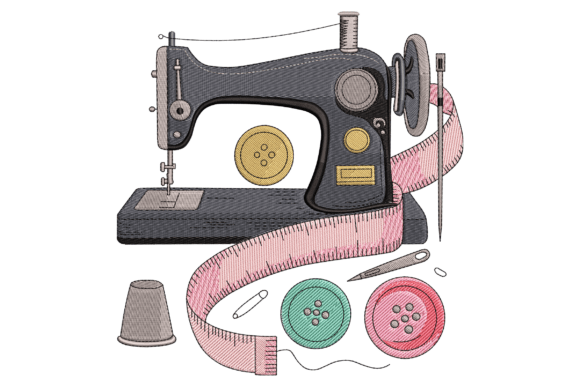
2. Sewing Machine and Tools — a compact sewing-room motif
166 favorites · no public reviews shown
Creative Fabrica listing: Sewing Machine and Tools by Stitchfy.
This is a single sewing-themed design rather than a bundle. The product page lists a finished size of 3.51 × 3.34 inches, 14,747 stitches, an indicated 4 × 4-inch hoop and eight thread colors. The displayed formats are CND, DST, EXP, HUS, JEF, PES, VP3 and XXX. The description suggests it for T-shirts, towels and home décor.
Why it stands out: The listing gives a relatively clear set of production details. A 4 × 4 hoop requirement and a stated stitch count make it easier to compare with your machine’s embroidery area and expected stitch time than a listing that only shows a mockup.
What to check: The design is almost 15,000 stitches, so plan for more machine time than a small outline motif. The eight-color design also involves color changes. Confirm the exact color sequence in the Sewing Information PDF, and remember that thread colors shown in a preview may not match the brands or shades you own.
3. Quilt Block Machine Embroidery — the flexible size range for home décor
96 favorites · no public reviews shown
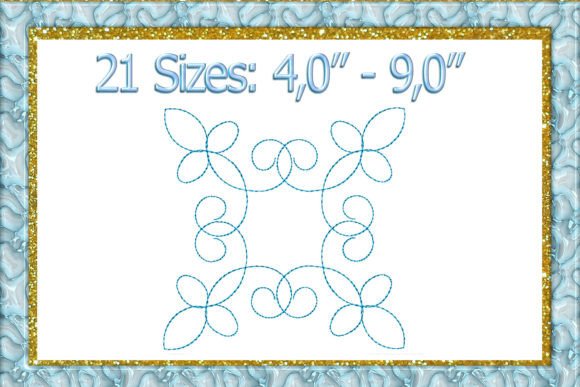
Creative Fabrica listing: Quilt Block Machine Embroidery by larisaetsy.
This swirl quilting-block motif is positioned for pillowcases, bags, table runners, bed sheets and other home décor. The page lists a series of square dimensions, starting at 4 × 4 inches and extending to 9 × 9 inches. The sewing details show a one-color version; the largest displayed 9 × 9-inch option is listed at 2,723 stitches.
Why it stands out: The range of sizes is useful if you have a larger hoop or want to repeat the same motif at different scales. A quilt block also has a clear practical use: it can become one panel in a larger textile project rather than a one-off decoration on a shirt.
What to check: A 9 × 9-inch option will not fit a 4 × 4 or 5 × 7 hoop. Select the actual size file that matches your machine, and do not assume the largest size can be reduced safely without digitizing software. The product page lists multiple formats, but the exact package should be checked before purchase.
4. Back to School Embroidery Design Bundle — classroom icons for small projects

70 favorites · no public reviews shown
Creative Fabrica listing: Back to School Embroidery Design Bundle by Pixels.Craft.
The listing describes a school-themed collection with books, pencils, crayons, backpacks, scissors, rulers, apples, notebooks and classroom icons. It is aimed at teacher gifts, student accessories, pencil pouches, tote bags, shirts and classroom décor. The page displays CND, DST, HUS, JEF, EXP, PES, VP3 and XXX format badges.
Why it stands out: This is a more versatile subject collection than a single decorative motif. A school-themed bundle can support several small projects across the school year, from a teacher tote to a pencil pouch or a personalized classroom item.
What to check: The listing does not make the total number of individual designs especially clear. Its Sewing Information entries show different dimensions and hoop requirements, including 4 × 4, 4 × 3, 3 × 4 and 4 × 2-inch frames. Check the individual design you want to stitch; do not assume every motif fits the same hoop.
View Back to School Embroidery Design Bundle on Creative Fabrica →
5. Woman Embroidery Design — a small applique-style file with several listed formats
54 favorites · no public reviews shown
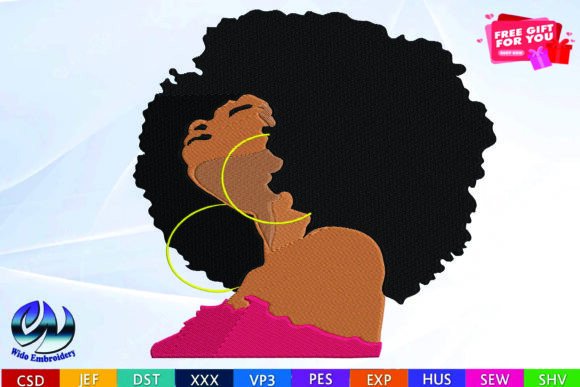
Creative Fabrica listing: Woman Embroidery Design by WidoEmbroidery.
The product page describes this as a machine file for clothing, bags, quilt blocks and T-shirts. It states that the design is offered in five sizes and ten formats, naming PES, SEW, XXX, JEF, DST, EXP, HUS, PEC, CND and VP3. The visible sewing information shows a 3.51 × 3.05-inch design with 12,149 stitches and a 4 × 4-inch hoop requirement.
Why it stands out: The page makes the intended use clear and names a broad set of embroidery formats. It may suit a maker looking for a small clothing or bag embellishment rather than a large multi-design bundle.
What to check: Although the listing says five sizes, the page’s detailed size section shows one size entry. It also states that the product is available as part of a subscription. Confirm which size files are actually included and whether the item is available through your account’s current plan before relying on the headline description. The designer also advises against resizing the design yourself.
6. Christmas Embroidery Design Bundle — a seasonal set with varied hoop requirements

50 favorites · 5.0 from 1 review
Creative Fabrica listing: Christmas Embroidery Design Bundle by Strawberry Art.
The bundle description lists 23 Christmas designs, including decorative frames, gift tags, holly, bows, a nutcracker, Santa, a tree, a dove, a teddy bear, a snowflake and festive lettering. The listing is intended for sweatshirts, kitchen and hand towels, stockings, pillows, tote bags, gift tags and holiday décor. It shows format badges for CND, DST, EXP, HUS, JEF, PES, VP3 and XXX.
Why it stands out: The collection offers more than one kind of holiday project, from small gift tags to clothing and home décor. It is the most seasonal option in this shortlist and may be useful when planning holiday projects in advance.
What to check: The listing preview mentions a 4 × 4-inch hoop, but the detailed Sewing Information entries show several dimensions and hoop requirements, including 4 × 3, 4 × 4, 3 × 4, 4 × 2 and 2 × 4 inches. The description also tells buyers to refer to the actual download contents for the available formats. One 5-star review is not enough to establish consistent results across all 23 files. Check the PDF and individual files before starting a project.
View Christmas Embroidery Design Bundle on Creative Fabrica →
4. PES, DST, JEF and other embroidery file formats
Embroidery formats are not interchangeable picture formats. A machine embroidery file contains stitch coordinates and machine instructions, and different machines or software packages support different file types. A design preview may look perfect on the product page while the file itself is unreadable by your machine. Check the model manual or manufacturer support page rather than relying on a broad statement such as “works with all embroidery machines.”
| Format | Common association | What to verify |
|---|---|---|
| PES | Commonly associated with Brother, Baby Lock and related embroidery workflows | Confirm that your exact machine model accepts PES and the version or feature set in the file. |
| JEF | Janome and many Elna embroidery machines | Janome identifies JEF as its standard machine-readable stitch-data format; check the model manual for any additional formats. |
| DST | Tajima and many commercial or home embroidery workflows | DST may not carry thread-color information. Janome notes that its machines assign thread colors when opening DST files. |
| EXP | Melco and some BERNINA-related workflows | Check whether your machine reads EXP directly or needs compatible software to convert or transfer it. |
| HUS, VIP, VP3 | Commonly associated with Husqvarna Viking and Pfaff ecosystems | Support differs by generation and model; verify the machine manual rather than assuming every model accepts all three. |
| XXX, PEC, SEW, CND and others | Legacy or manufacturer/software-specific formats | Check the exact file type against your machine and editing software. A badge on a marketplace page is not a universal compatibility guarantee. |
Brother’s support documentation lists PES and DST among formats accepted by certain models, while Janome identifies JEF as its default stitch-data format and explains that DST does not store thread colors in the same way. BERNINA’s software documentation lists a broader set of machine formats, including PES, PEC, HUS, VIP, VP3, EXP and DST. These references illustrate why the machine model matters: support can differ between a machine’s built-in USB reader, its editing software and a third-party design program.
Do not confuse SVG with a machine embroidery file
An SVG is a vector graphic. It can describe outlines and shapes for cutting or editing, but it does not automatically contain the stitch sequence, density, underlay, trims and other machine instructions required for embroidery. To turn artwork into a stitch file, you generally need embroidery digitizing software or a digitized design made for your machine. Renaming an SVG to PES or changing the extension does not convert it.
Likewise, a PNG or JPG preview is usually there to show what the finished design may look like. It is not necessarily the file you load into the embroidery machine. When a product listing includes both image formats and stitch formats, read the included-file list carefully so you know which file does which job.
5. Hoop size, design dimensions and stitch count
The hoop is the frame that holds fabric and stabilizer while the machine stitches. The usable embroidery area is determined by the machine and the compatible hoop—not by the size of the product image or the physical hoop’s outside dimensions. A listing may show a 4 × 4-inch hoop requirement, but the design’s actual width and height can be smaller than four inches in each direction.
Use the smallest required hoop as a compatibility limit
Creative Fabrica’s Embroidery FAQ explains that the hoop size shown on a product page is the minimum hoop size for that design. A larger hoop can be used, but a smaller one cannot fit the design as supplied. That is a helpful rule of thumb, but the machine’s own embroidery area and hoop geometry still control what is possible. A machine advertised with a 5 × 7 hoop may have a usable field that is slightly different from the nominal dimensions.
Before downloading, compare the design’s width and height in inches or millimeters with your machine’s maximum field. Also check whether the file includes the size you need or whether it is only one size in a larger preview. If a bundle has multiple sizes, confirm that each size is included as a separate stitch file rather than assuming your software can resize the largest file cleanly.
Stitch count helps estimate workload, not design quality
A stitch count tells you how many stitches the machine is instructed to make. It can help estimate stitching time and give you a sense of how dense or complex a design may be, but it is not a quality score. A higher count may reflect more detail, a larger design or simply a denser digitizing approach. A lower count may be suitable for a simple outline or quilting motif.
For example, Sewing Machine and Tools is listed at 14,747 stitches in a 4 × 4-inch hoop, while Woman Embroidery Design is listed at 12,149 stitches in the same nominal hoop size. The Quilt Block page shows 2,723 stitches for its 9 × 9-inch option. Those numbers illustrate how differently designs can be digitized; they do not prove that one will stitch more cleanly. Thread quality, underlay, density, fabric, stabilizer, hooping and machine setup all affect the result.
Look for a Sewing Information PDF
Creative Fabrica says individual embroidery listings include sewing information that can be previewed before download. Use it. The PDF may show exact dimensions, stitch count, color count, hoop size, thread chart and the order in which colors are stitched. This is often more useful than a gallery image because it gives you the production details needed to decide whether the file fits your machine and project.
6. Fabric, stabilizer and test-stitch basics
The same design can behave differently on a woven cotton tote, a stretchy T-shirt, a towel or a thin woven fabric. Stabilizer supports the fabric while the machine stitches and helps limit puckering, shifting and distortion. The correct choice depends on the fabric, design density and whether you want the backing to remain in the finished item.
| Stabilizer type | Common use | Important limitation |
|---|---|---|
| Cut-away | Stretch fabrics, knits and projects that need lasting support behind the stitches | It remains behind the embroidery; trim the excess carefully rather than trying to remove it completely. |
| Tear-away | Many stable woven fabrics and designs where excess backing can be removed after stitching | It is not the right default for every stretchy or delicate fabric; tearing too aggressively can distort stitches. |
| Wash-away | Projects where backing needs to dissolve, some delicate fabrics and certain freestanding-lace workflows | It depends on water or the specified removal method and may not provide the same permanent support as cut-away. |
Brother’s machine guidance recommends stabilizer for embroidery, especially on lightweight, stretch or coarse-weave fabrics, and warns that unsupported fabric can contribute to puckering, misalignment or needle problems. Creative Fabrica’s stabilizer guide also recommends matching the backing to the fabric, stitch design and desired appearance on the reverse side. Follow the stabilizer manufacturer’s instructions and the embroidery-machine manual; do not treat one backing type as suitable for every material.
Run a test on similar fabric before the final item
For a garment, towel or gift that matters, stitch a sample on a scrap that is as close as possible to the final fabric, using the same stabilizer, needle, thread and hooping method. Check whether the fabric puckers, the outline shifts, small details close up, the thread breaks or the back looks too bulky. A test sample can reveal problems before they become permanent on the finished item.
Do not resize a stitch file casually. Changing the dimensions of a digitized design can alter stitch density, pull compensation, underlay and small details. If the listing’s designer says not to resize the file, respect that instruction. If you need another size, look for a supplied size file or use suitable embroidery software and digitizing knowledge rather than stretching the design in a general image editor.
7. Commercial use and Creative Fabrica licensing
Buying or downloading a machine embroidery file does not mean you own the original design. The license controls what you may make and sell, whether you can use the asset commercially, and what you may not redistribute. Read the license that applies to the way you obtained the file, not just the short sentence in the product description.
Creative Fabrica currently separates its Single Sales License from its Subscription License. Its help center says subscription downloads are governed by the Subscription License; for Crafts downloaded under an active subscription, the platform describes a lifetime commercial license for continued use after cancellation. The Single Sales License applies to an individual purchase rather than a subscription download. The exact terms can change, so read the current license page and check that the file’s category and download route are covered.
Commercial use of a finished embroidered item is different from reselling or sharing the original stitch file. Do not redistribute the source files, upload them to another marketplace, or include them in a bundle where the original design can be extracted. Avoid protected characters, logos, celebrity likenesses and brand marks unless you have the required rights. Creative Fabrica’s copyright guidance specifically warns about protected characters, logos and trademarks.
If you make items for customers, keep a record of the product listing, the license version and the date you downloaded or purchased the file. That makes it easier to confirm which terms applied when you created the finished item.
8. A practical checklist before downloading
- Machine model: Write down the exact brand and model, not just the brand name.
- Accepted file types: Confirm the extension supported by the machine or the software you use to transfer designs.
- Hoop size: Compare the required hoop and finished width/height with your actual embroidery area.
- Included sizes: Check whether alternate dimensions are included as stitch files or only shown in preview images.
- Stitch count: Use the count to estimate workload and consider the design’s density, not as a quality rating.
- Thread colors: Review the color chart and number of changes; some formats may not preserve thread-color information.
- Digitizing details: Look for a Sewing Information PDF, digitized-by-hand label, stitch sequence and any resizing warnings.
- Fabric and stabilizer: Match the backing and needle to the material and run a test stitch before the final item.
- License: Check whether you are downloading through All Access, a freebie or a single purchase, and read the matching license.
- Download conditions: A “free” or “$0.00” label may be tied to an All Access plan or trial. Check the current checkout terms before assuming the file is permanently free.
- What is not included: Confirm whether the listing is only a digital file; thread, fabric, stabilizer, blank garments and finished patches are normally separate.
For the next part of the decision, see beginner embroidery kits.
Visible mending and textile-repair techniques is covered in visible mending and textile-repair techniques.
9. Machine embroidery design FAQs
What is the difference between PES, DST and JEF?
They are different machine embroidery file formats. PES is commonly associated with Brother and Baby Lock workflows, JEF is Janome’s standard stitch-data format, and DST is a Tajima format used by many embroidery workflows. Exact support depends on your machine model and software. Check the manufacturer’s documentation before downloading.
Can I use an SVG file in an embroidery machine?
Not as a direct substitute for a stitch file. SVG stores vector shapes, while a machine embroidery file contains stitch instructions. You need embroidery digitizing software or a ready-digitized machine file to convert artwork into stitches. Simply changing the file extension does not perform that conversion.
Does a 4 × 4 embroidery design fit every 4 × 4 hoop?
Not necessarily. Check the design’s exact width and height, the machine’s usable embroidery field and the compatible hoop model. Nominal hoop dimensions and actual stitchable area are not always identical. A design also needs clearance so the needle and frame can move without interference.
Is a higher stitch count better?
No. Stitch count is a workload and design-detail indicator, not a quality score. A high count may mean more detail or density, but it can also increase stitch time and the need for stable fabric support. Review the preview, sewing information, dimensions and sample guidance together.
Can I resize a downloaded embroidery design?
Only if you have suitable embroidery software and understand how resizing affects stitch density, underlay and pull compensation. A general image editor cannot safely resize stitch instructions. If the designer advises against resizing, use a supplied size file or choose another design that fits your hoop.
Why do the thread colors look different from the product preview?
Thread charts and color assignments can vary by machine, thread brand and file format. Creative Fabrica notes that color information may not be preserved across every format or conversion. Use the product’s color chart as a guide and substitute the closest thread shades available to you.
Can I sell products made with Creative Fabrica embroidery files?
Creative Fabrica provides commercial-use licenses, but the applicable terms depend on whether you bought the item individually or downloaded it through a subscription. Read the current Single Sales or Subscription License and distinguish selling a finished item from redistributing the original digital file.
Are Creative Fabrica embroidery files physical patches?
No. The listings in this guide are digital machine embroidery designs. You need a compatible embroidery machine, suitable fabric, thread, stabilizer and any required software to stitch the design. The preview image is not a finished patch or a physical product shipped to your home.
Final take: buy the file that fits your machine, not the biggest bundle
The most useful machine embroidery design is the one you can load, hoop and stitch with the equipment you already own. The Personalized Name Tag bundle has the strongest visible favorite count in this shortlist, but its format information needs a closer check. Sewing Machine and Tools offers clearer production details for a compact 4 × 4 project. Quilt Block is more relevant if you have a larger hoop, while the school and Christmas bundles offer themed collections with multiple design sizes to verify.
Before you click download, open the Sewing Information PDF, match the file extension to your exact machine, confirm the hoop size and read the license. If you are still deciding between hand embroidery and machine embroidery, our guide to beginner hand embroidery kits covers hoops, floss, needles and stitch instruction from a different starting point.