
A Christmas SVG can look perfect on a product thumbnail and still be frustrating on the cutting mat. The useful question is not which design looks prettiest; it is whether its smallest details, layer structure, and finished size make sense for the project you want to make. These seven Creative Fabrica designs cover lettering, characters, and seasonal illustrations, with practical notes on where each one is likely to work best.
Quick comparison: which design fits your project?
| Design | Visual style | Likely cut challenge | Best starting project |
|---|---|---|---|
| Christmas Ornaments | Wide decorative lettering | Medium: narrow joins and small accents | Card front, banner, or sign |
| Christmas Spirit Loading | Playful phrase and progress bar | Medium: stripes and small gaps | Sweatshirt or craft-room sign |
| Merry Christmas | Script greeting with tree detail | Medium–high: connected script | Medium-size card or sign |
| Believe | Decorative holiday lettering | Medium: check separate color layers | Layered cardstock or larger decal |
| Cute Reindeer Face | Character illustration | High when reduced: facial details | Stocking or child-size shirt at a readable size |
| Christmas Gnome | Detailed character | High: small parts and possible alignment | Layered cardstock or a larger shirt graphic |
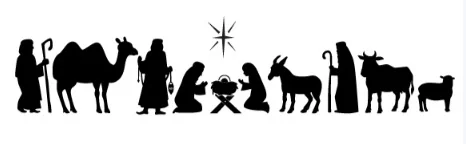
| Oh Holy Night Nativity Scene | Single-color silhouette | Medium–high: narrow negative spaces | Wide card, window decal, or display |
Seven Christmas SVG designs, one by one

Best for wide lettering
1. Christmas Ornaments
The preview combines a long Christmas wordmark with baubles, greenery, and snowflake accents. That wide composition is better suited to a card front, banner, or sign than to a small round ornament. Before cutting, check the narrow spaces inside the letters and the points where decorative pieces meet the main lettering.
Make it work: Set the final width first, then zoom in on the thinnest letter joins. If the design is being cut from vinyl, avoid reducing it until those joins become fragile. If the download contains separate colors, check whether the layers need to be aligned or attached in Design Space.

Best playful phrase
2. Christmas Spirit Loading
This humorous phrase has a clear use case: a sweatshirt, tote, or craft-room sign for someone who likes a little seasonal sarcasm. The progress-bar detail gives it personality, but the narrow stripes can become fiddly when the artwork is made small.
Make it work: Choose a garment or sign with enough width for the full phrase. Inspect the bars and small counters in the actual SVG, not only the preview. The Creative Fabrica listing for this design identifies SVG, transparent PNG, EPS, and DXF formats; verify the files on the exact linked listing before relying on a particular format.

Best traditional greeting
3. Merry Christmas
The script lettering and tree detail give this design a classic holiday-card feel. Script can look elegant at a larger size, but connected strokes are less forgiving than block lettering. A design that reads clearly on a monitor may close up when cut small.
Make it work: Test the exact phrase at the finished dimensions. Look for tight joins, tiny star cutouts, and narrow spaces between letters. For a small gift tag, a simpler font or single-word design will usually be easier to weed.

Best decorative word design
4. Believe
“Believe” is a short word, so it can work on a sign, card, or larger garment graphic. The holiday decorations make it more interesting than plain lettering, but they also raise a practical question: are the colors separate layers, or is the download a single combined design?
Make it work: The linked Creative Fabrica craft listing describes SVG, transparent PNG, EPS, and DXF formats. For a multi-color paper project, inspect the SVG layers and plan the order of assembly before cutting. For a one-color vinyl decal, check whether the detailed accents remain readable when simplified to one material.

Best character-style design
5. Cute Reindeer Face
A reindeer face is easy to understand at a glance, which makes it a natural choice for a stocking, gift bag, or child-size sweatshirt. The trade-off is detail. Antlers, eyes, and a small nose can become tiny islands or narrow cutouts when the design is reduced.
Make it work: Use a larger placement area and inspect the smallest facial pieces in the SVG. If the design is intended for a layered look, check how many separate pieces need to be placed. For a small item, consider a simpler silhouette instead.

Best detailed character
6. Christmas Gnome
The gnome preview has more visual pieces than a simple phrase: a patterned hat, beard, candy cane, and peppermint detail. That makes it appealing for a larger shirt graphic or layered paper craft, but it is not the design I would choose for a first tiny vinyl decal.
Make it work: The linked Creative Fabrica listing describes SVG, transparent PNG, EPS, and DXF formats. Open the SVG and count the layers before starting. If you are using cardstock, plan color order and alignment; if you are using vinyl, check whether the smallest details can be weeded without tearing.
Best faith-centered silhouette
7. Oh Holy Night Nativity Scene
This single-color Nativity silhouette is a more understated alternative to decorative lettering. It suits a wide card, window decal, or seasonal display. Its challenge is negative space: the gaps between figures and the small openings in the silhouette need to survive cutting and handling.
Make it work: The Creative Fabrica craft listing identifies SVG, transparent PNG, EPS, and DXF formats. Check the narrowest gaps at the size you plan to cut. Thin cardstock or delicate vinyl may not be the best choice if the design contains very small bridges.
Five checks before you send a Christmas SVG to the mat
- Open the real SVG. A flattened preview cannot show every cut path, hidden layer, or small island.
- Set the final size. Inspect the thinnest stroke, smallest hole, and narrowest bridge at the dimensions you will actually make.
- Review operations and layers. Cut, score, and draw lines are different jobs. Confirm the layer order and color alignment.
- Match the material to the design. Cardstock, adhesive vinyl, and heat-transfer vinyl need different material settings and handling.
- Test on scrap. A small test cut is cheaper than wasting a full sheet or damaging a garment.
Check the license before making items to sell
Creative Fabrica’s product pages may show a commercial-use badge, but the full license controls what you can sell. Check whether the item is categorized as a Craft, Graphic, or Font and whether your intended use is a finished physical product, client work, or print-on-demand. The current subscription license is version 1.6, effective April 10, 2026. You may not redistribute the original digital file.
Which one should a beginner choose?
For a first cut, start with a short phrase or a simple single-color design. Christmas Spirit Loading or Believe may be easier to plan than the detailed gnome or reindeer, provided the smallest details remain large enough. If you want a project with folds or multiple paper layers, use the assembly guide in the listing and make a paper prototype before cutting your final cardstock.
If you are still unsure whether a download is a cut file, a printable image, or a font, start with our guide to choosing SVG files for Cricut. For simpler first projects, see five Christmas SVG projects for beginners.
Frequently asked questions
Which Christmas SVG is easiest for a beginner?
Short, bold lettering and single-color shapes are usually easier than small script, detailed characters, or layered scenes. The actual SVG matters more than the thumbnail, so inspect it at the finished size.
Do all seven designs include SVG, PNG, and DXF?
No. Formats differ by product. Some Creative Fabrica craft listings identify SVG, transparent PNG, EPS, and DXF, but do not assume that applies to every item in this roundup. Check the exact product page and the ZIP contents.
Can I sell finished products made with these designs?
Only if the license attached to the exact download permits your intended product and sales channel. Permission to sell a finished physical item does not allow you to redistribute the original SVG or bundle.
Should I mirror every Cricut design?
No. Mirroring is normally required for many heat-transfer vinyl workflows, not for ordinary adhesive vinyl or cardstock. Follow the material instructions and check the mat preview before cutting.
Bottom line: Choose the design that fits the blank and finished size, not the one with the busiest preview. A clean, readable cut is usually more satisfying than a complicated design that is difficult to weed or assemble.