
USB mouse movers come in two very different forms: small devices that send input through a USB connection, and mechanical platforms that physically move a regular mouse. The four products here cover both approaches. They differ in setup, customization, portability, power, and how much you should expect to configure before first use.
This comparison is based on the supplied product information and buyer feedback for YIOUG FM-1, TECH8 USA's 3D Hologram Mouse Mover, Vaydeer S4, and AUEDROT AUB09YTB1DSB. It is not a hands-on test of movement patterns, reliability, IT detection, or long-term durability.
Four mouse movers compared
| Model | Type | Setup | Controls / customization | Price in supplied capture | Main trade-off |
|---|---|---|---|---|---|
| YIOUG FM-1 | USB-A hardware input device | Browser-based setup for custom workflows | Coffee, Reading, saved Custom workflow | About $29.90 | Most flexible, but first-time setup can open a browser page and needs explanation |
| TECH8 3D Hologram | Mechanical movement disc | Place a compatible mouse on the disc; power from USB | Three motion levels; 1–2 hour timer listed | About $19.99 | Mouse shape and placement affect movement; moving parts can stick or fail |
| Vaydeer S4 | Small USB dongle | Plug in and use the physical switch | Simple on/off operation | About $15.99 | Very little customization; buyer feedback includes durability concerns |
| AUEDROT AUB09YTB1DSB | Small USB dongle | Plug in; short press to change modes | Subtle 1–2 pixel mode and random mode | About $9.99 | Simple and inexpensive, but no timer or workflow editor |
Prices are snapshots from the supplied retailer records, not live quotes. Check the current listing, exact connector, seller, and return terms before buying.
YIOUG FM-1 — the most configurable option, with a setup caveat
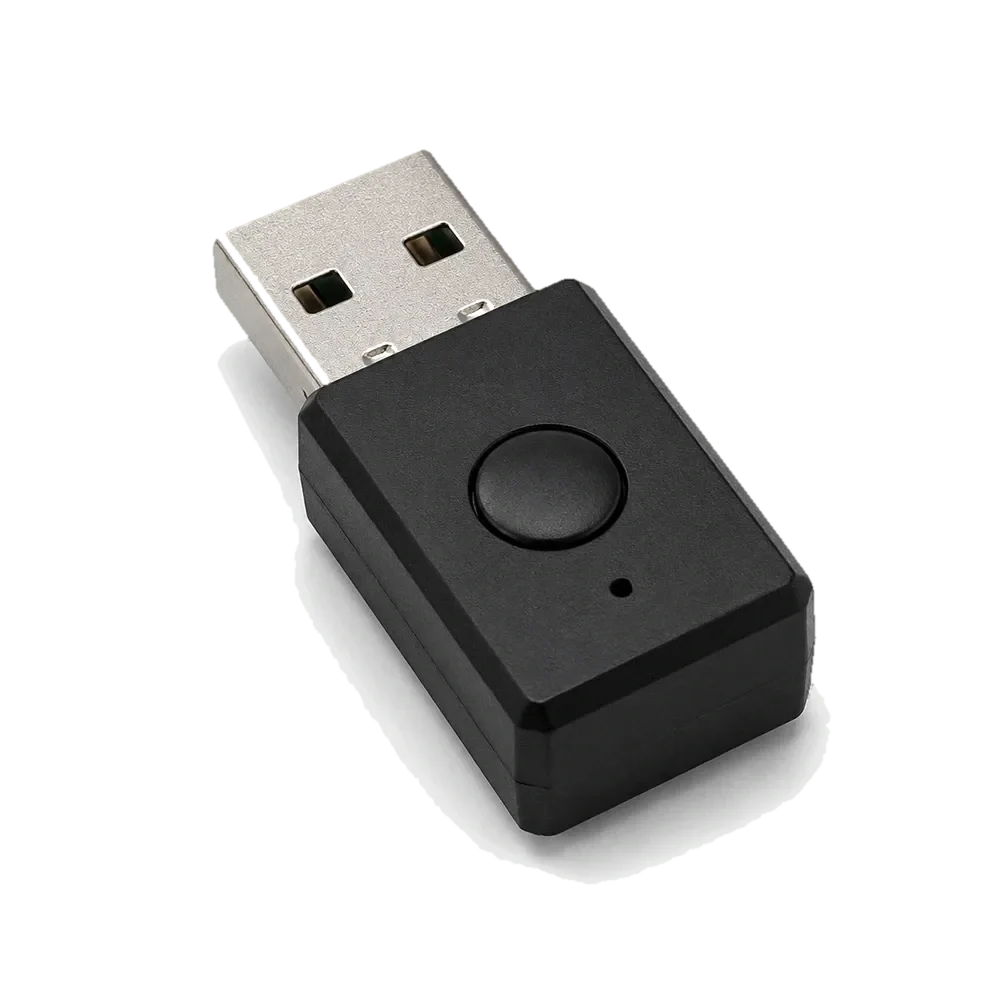
YIOUG FM-1 Programmable USB Mouse Mover
USB-A · Windows 10/11 · Coffee, Reading and Custom modes
FM-1 is the only product in this comparison built around three distinct operating modes and workflows saved to the device. Coffee mode uses subtle randomized cursor movement. Reading mode adds page scrolling, occasional reverse scrolling, and cursor movement. Custom mode runs a sequence the user has already created and saved through the YIOUG Device Center.
Configuration is performed in Chrome or Edge on a supported Windows computer. From any operating mode, press and hold the button for six seconds until the LED turns white, connect to the browser editor, arrange the supported steps and durations, and save the workflow to the device. Once saved, the workflow runs from onboard memory without a desktop app or background service.
The first-use experience deserves attention. If no workflow has been saved, selecting Custom can trigger a browser-based setup guide. Two negative reviews in the supplied feedback describe the unexpected browser opening as alarming; a Vine reviewer also says the device briefly took over mouse and keyboard input to open the setup page. The page is intended to guide initial configuration, but that does not make the surprise irrelevant. Read the setup instructions before connecting it, especially on a work-managed computer. After a workflow is saved, Custom runs that saved sequence rather than reopening the setup flow.
- Best for users who actually want scrolling and saved, timed workflows rather than a single movement pattern.
- Custom Mode is playback, not the editor. Hold the button for six seconds until the LED turns white to configure.
- A first-time unconfigured Custom selection can open the setup page; this is a real usability caveat, not something to hide.
- Designed for Windows 10/11 setup; do not assume macOS configuration support.
- The device is associated with the site owner, as disclosed above.
TECH8 USA 3D Hologram Mouse Mover — mechanical movement with a timer
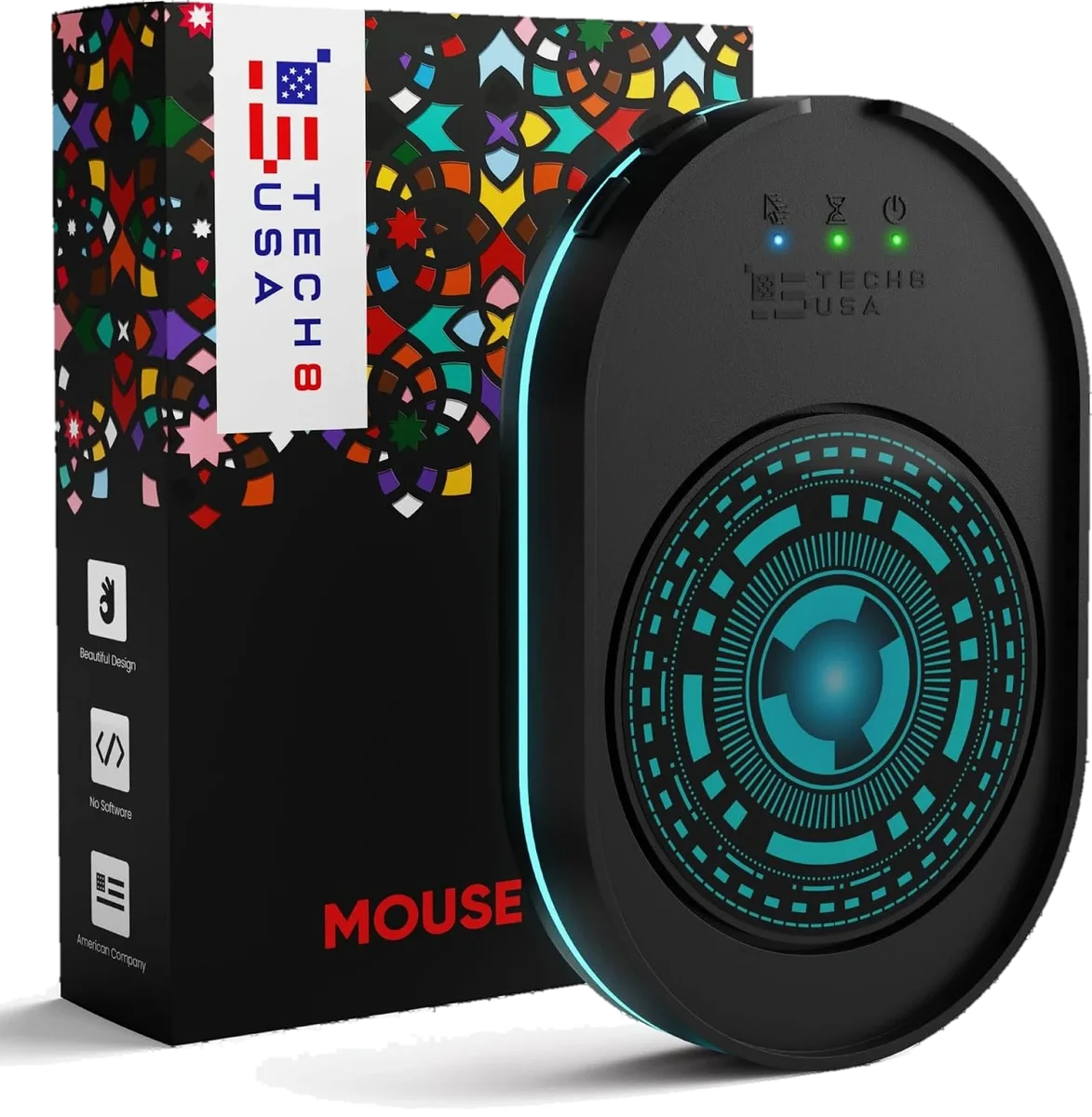
TECH8 USA 3D Hologram Mouse Mover
Mechanical disc · Three motion levels · 1–2 hour auto timer listed
TECH8 takes a different route: instead of appearing as a USB mouse device, it physically moves a compatible mouse on a rotating disc. The supplied listing describes three movement levels (Low, Medium and High), an on/off button, an adjustable ambient glow ring, and a one- to two-hour auto shut-off timer. It is intended to work without software installation.
Because the mouse itself sits on a moving surface, fit matters. A mouse with an unusual base, a very small sensor window, or a shape that does not sit securely may not track as expected. Buyer feedback in the supplied record is positive about quiet operation and keeping a computer awake, but also mentions discs that stop working and mice that catch on the edge. TECH8's support information says the mover is powered from a 5V USB source; the supplied marketplace specification table also contains a conflicting battery-powered field, so confirm the exact power cable and version with the seller.
- A mechanical disc rather than a USB HID dongle; the mouse remains on the platform.
- The supplied listing describes three speeds and a 1–2 hour shut-off timer.
- Mouse size, base shape and placement can affect whether the disc moves it reliably.
- Buyer feedback mentions some units stopping or a mouse catching on the disc edge.
- TECH8's support information describes 5V USB power; verify the exact package because the supplied listing's power field conflicts.
Vaydeer S4 — a simple metal USB switch
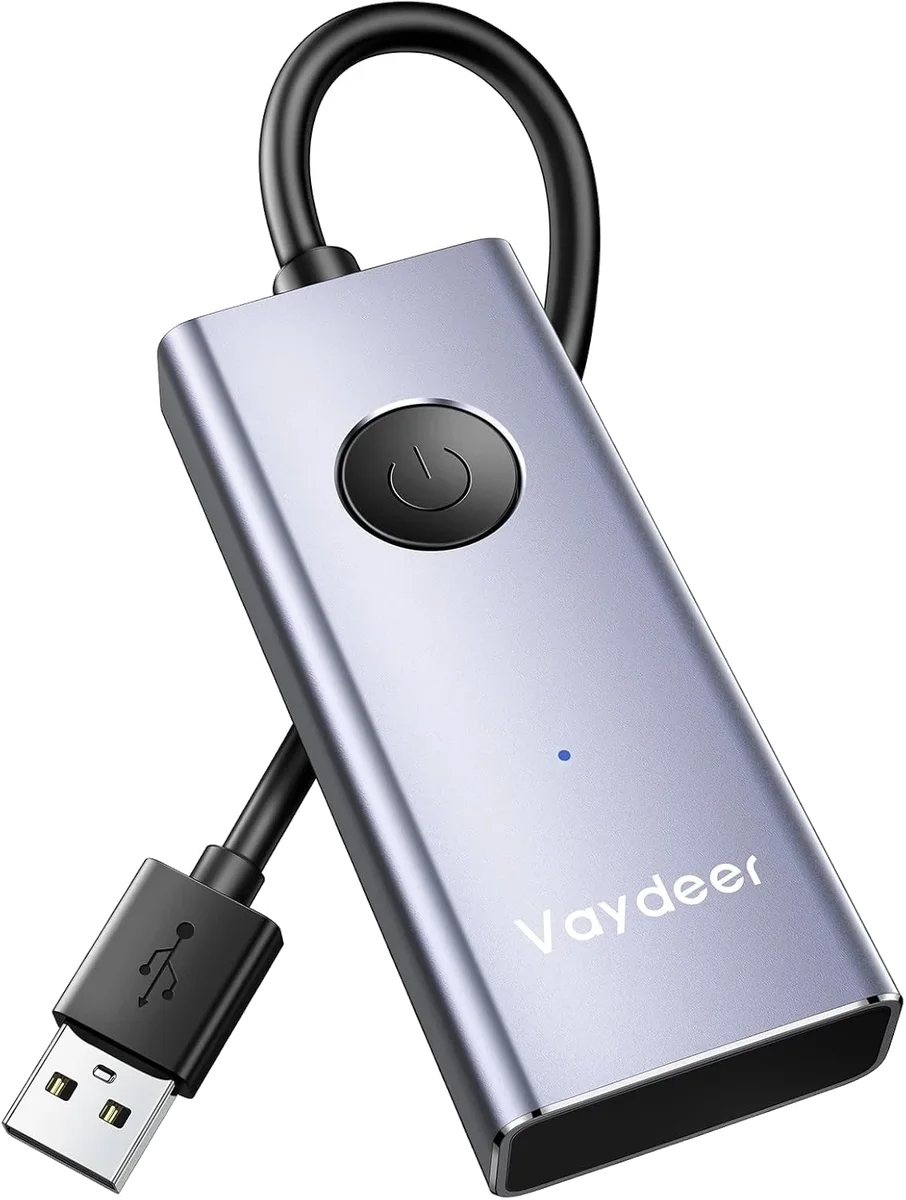
Vaydeer S4 Metal USB Mouse Jiggler
Model FM3071 · Metal body · One physical on/off button
The Vaydeer S4 is a small metal USB device with one physical switch. Its appeal is simplicity: connect it to a compatible USB port and use the button to start or stop movement. There is no workflow editor, timer, or scrolling mode in the supplied product information. The listing gives dimensions of about 2.95 × 1.14 inches and a weight of 1.23 ounces.
The supplied listing states broad Windows, macOS and Linux compatibility and a six-year warranty, but warranty coverage should always be confirmed for the seller and exact model. Buyer feedback praises the easy setup and basic keep-awake function; other buyers report that movement can stop or the unit can fail within weeks. A metal shell does not by itself establish long-term reliability.
- Best for buyers who want a physical on/off control and no configuration step.
- No programmable workflow, scroll function, or auto shut-off timer is listed.
- The product record lists a six-year warranty; verify the terms and seller before relying on it.
- Customer feedback is mixed on whether every unit continues moving reliably over time.
AUEDROT AUB09YTB1DSB — the smallest, simplest two-mode dongle
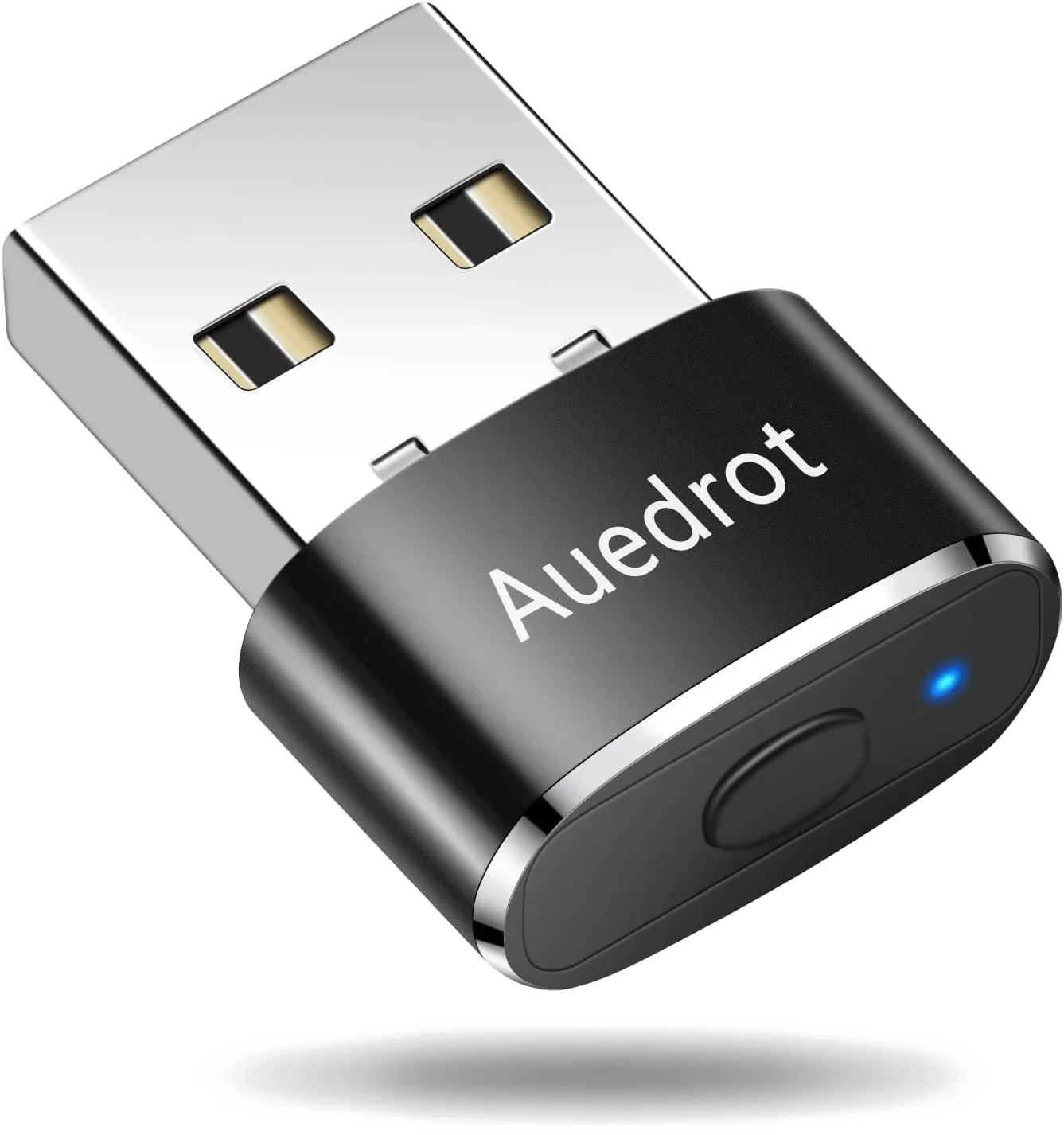
AUEDROT USB Mouse Jiggler
Model AUB09YTB1DSB · Aluminum alloy · Two movement modes
AUEDROT is the lowest-cost and smallest USB dongle in the supplied comparison. It has two modes: a slight 1–2 pixel left-to-right movement and a more obvious random movement pattern. A short press switches modes; a long press turns the device off. It is described as plug-and-play and does not require a separate desktop application.
The supplied record lists an aluminum-alloy body, USB connection, and one-year manufacturer warranty. The review summary praises its small size, simple button and plug-and-play operation, but negative feedback includes units that arrive inactive, stop working, or become difficult to remove from a USB port. The listing's use of the word “undetectable” should not be read as a security guarantee: USB device enumeration and endpoint monitoring vary by computer and organization.
- Best for a tiny, low-cost dongle with two selectable movement patterns.
- The subtle mode moves only about 1–2 pixels; some buyers find it too slight for their preference.
- No timer or saved workflow is listed.
- The supplied listing states a one-year warranty; check the current seller's terms.
- Reports of failed units and connector issues are worth considering before leaving it plugged in permanently.
How these four designs differ in practice
Mechanical disc or USB dongle?
A mechanical platform physically moves a regular mouse. That means you need space on the desk, a suitable mouse shape, and a stable position for the device. A USB dongle sends input through the computer's USB interface and takes up much less space, but it may be subject to the computer's device policies. Neither design should be assumed to work with every computer or every security configuration.
Do you need a timer or a saved workflow?
If you only need to keep a personal computer awake during a permitted download or presentation, a basic switch may be enough—or the computer's own power settings may be better. TECH8's timer can be useful if you do not want a mechanical disc running indefinitely. YIOUG's saved workflow is more flexible, but it requires a deliberate setup step and a Windows-compatible browser.
What “undetectable” does—and does not—mean
Some listings describe their products as undetectable because a USB device may be recognized as a mouse or composite device rather than as a named “mouse jiggler.” That does not mean it is invisible to device management, endpoint security, USB logs, or employer monitoring. A mechanical disc avoids adding a USB input device, but it still does not make activity legitimate or prove that a person is working. We do not test or rank these products by their ability to evade monitoring.
Read the negative feedback, not just the star themes
For Vaydeer and AUEDROT, the main concern in the supplied feedback is basic reliability: some units stop moving or fail to work. For TECH8, the moving disc introduces its own possible failure points, including sticking and mouse placement. For YIOUG, the key complaint is not the normal movement modes but the first-use setup behavior and the distinction between setup mode and Custom playback. These are different problems, so they should not be collapsed into a single “quality” score.
Which mouse mover should you choose?
- Choose YIOUG FM-1 if you need multiple movement modes, reading scroll, and a saved workflow—and you are comfortable with browser-based setup on Windows. Be aware of the first-time setup-page behavior before plugging it into a managed computer.
- Choose TECH8 if you prefer a mechanical disc and want speed settings plus an auto shut-off timer. Check mouse fit and power-cable details first.
- Choose Vaydeer S4 if you want a simple metal USB device with a physical switch and do not need custom modes.
- Choose AUEDROT if you want a very small, inexpensive dongle with two basic movement patterns, while accepting the reported reliability concerns.
- Choose built-in power settings instead if your goal is simply to prevent your own computer from sleeping. Windows and macOS already provide ways to adjust sleep behavior without extra hardware.
Frequently asked questions
Can a mouse jiggler guarantee that IT cannot detect it?
No. A device may appear as a generic USB mouse or composite device, but that is not the same as being invisible to endpoint management or security monitoring. Do not rely on marketing claims that promise undetectability.
Why does the YIOUG FM-1 open a browser page the first time?
If no Custom workflow has been saved, selecting Custom can guide the user to the browser-based setup page. The page is where the workflow is created and saved to the device. Some buyers found the automatic opening unexpected, so read the setup instructions before connecting it. Once a workflow is saved, Custom runs that workflow from onboard memory.
Does Custom Mode create a workflow?
No. Custom Mode plays a workflow that has already been configured and saved. To create or edit one, hold the FM-1 button for six seconds until the LED turns white, then use the YIOUG Device Center in Chrome or Edge on a supported Windows computer.
Does the YIOUG FM-1 work with Mac?
The current configuration process is designed for Windows 10/11. Do not assume that the browser-based setup or workflow editor is supported on macOS.
Does TECH8 need software?
TECH8 describes its mechanical mover as requiring no software installation. Its support information describes power from a 5V USB source. Confirm the exact cable and version supplied with the listing.
Is a mechanical mouse mover more private?
It does not add a USB mouse device to the computer in the same way a dongle does, but that does not make it a way to bypass workplace rules or monitoring. Use it only where permitted.
Can Windows power settings do the same job?
For a personal computer, often yes. Adjusting the sleep and display settings is usually the simplest solution when you only need the computer to stay awake during a long task.
Bottom line: These products solve the same narrow problem in different ways. YIOUG offers the most configuration but has a first-run setup step that should be clearly understood. TECH8 relies on a mechanical disc and timer. Vaydeer and AUEDROT keep things simple with USB dongles. Choose based on setup, compatibility, and reliability trade-offs—not promises that a device is invisible.