
Best Dash Cams for 2026: 5 Models Compared
A dash cam is only useful if it records the detail you need, keeps the right clips, and is powered correctly when the car is parked. A front-only 4K camera can be a good fit for a commuter who wants a simple record of the road ahead. A driver who carries passengers may want a cabin camera as well, while someone who parks on the street may care more about buffered parking mode and a reliable hardwire installation than another resolution upgrade.
Affiliate disclosure: This article contains affiliate links. TestedWise may earn a commission if you purchase through them, at no additional cost to you. Read the full disclosure.
We compared five current Amazon US listings using manufacturer specifications, current category listings, and independent published testing. Car and Driver's July 2026 review tested the VIOFO A329S, Vantrue E1 Pro, and 70mai T800; we keep those test findings separate from the Amazon listing details for the ROVE and REDTIGER models. This is not a hands-on dash-cam test by TestedWise.
Quick answer: The VIOFO A329S 3CH is the premium choice if you want front, rear, and cabin footage with high-resolution recording and external SSD support. The Vantrue E1 Pro is a compact front-only 4K option. The 70mai T800 gives you 4K front, 4K rear, and 1080p cabin coverage. The ROVE R2-4K Dual and REDTIGER F7NP are more straightforward front-and-rear systems; compare their exact bundles, storage cards, and parking-mode accessories before ordering.
Dash cam comparison
| Model | Camera coverage | Published resolution | Best fit | Watch for |
|---|---|---|---|---|
| VIOFO A329S 3CH | Front, rear, cabin | 4K front; 2K rear; 2K cabin | Premium all-around recording and flexible storage | No microSD card included; parking mode needs suitable power |
| Vantrue E1 Pro | Front only | 4K / 30 fps | Compact windshield footprint and strong front footage | No rear or cabin camera; microSD not included |
| 70mai T800 | Front, rear, cabin | 4K front; 4K rear; 1080p cabin | Three-channel coverage for daily or rideshare driving | App and low-light detail are not its strongest points in the cited test |
| ROVE R2-4K Dual | Front and rear | 4K upscaled front; 1080p rear, per listing | Popular dual-camera setup with a bundled card | Check the exact recording mode, card size, and kit contents |
| REDTIGER F7NP | Front and rear | 4K front; 1080p rear, per listing | Value-oriented dual-camera package | Bundles and included-card capacity can vary |
Resolution is only one part of the picture. Sensor quality, HDR behavior, lens angle, exposure, compression, frame rate, and whether the camera is recording one view or three all affect what you can identify later. A wider field of view is not automatically better if it makes distant details smaller.
The five dash cams worth comparing

Best premium three-channel setup
1. VIOFO A329S 3CH
The A329S is the most complete system in this comparison. The three-channel configuration records 4K from the front, 2K from the rear, and 2K from the cabin. Car and Driver named the A329S its best overall dash cam in its July 2026 update, praising its detail and HDR performance. The review also notes Wi-Fi 6, a simple app, and the ability to record to a microSD card or an external SSD over USB-C.
The trade-off is cost and installation complexity. The tested three-channel version does not include a microSD card, supports up to 512GB on microSD, and can use an external SSD up to 4TB. Parking protection requires a compatible hardwire kit or battery pack. The Amazon listing selected here is the front/cabin/rear package; do not confuse it with A329S two-channel or telephoto variants.
- Front 4K, rear 2K, and cabin 2K in the three-channel configuration.
- Wi-Fi 6, GPS, HDR, and microSD or external SSD recording.
- MicroSD card and parking-mode power kit are separate purchases.
View the current Amazon listing · VIOFO product details · Car and Driver 2026 test

Best compact front-only 4K option
2. Vantrue E1 Pro
The E1 Pro is a small front-facing camera for drivers who do not want a large screen or a multi-camera wiring job. Car and Driver's 2026 test describes it as a compact 4K/30 camera using Sony's STARVIS 2 IMX678 sensor, with a 158-degree field of view, built-in GPS, a CPL filter, and a magnetic adhesive mount. Its review calls it a strong value for a driver who mainly wants clear forward-facing footage.
It is still a front-only camera. There is no rear or cabin view, and the cited test package did not include a microSD card. Vantrue lists support for cards up to 1TB. Buffered parking modes are available, but the hardwire kit is a separate purchase. This is a better choice for a simple windshield setup than for a rideshare driver who needs to record the passenger cabin.
- 4K / 30 fps front recording with a 158-degree field of view.
- STARVIS 2 sensor, GPS, 5GHz Wi-Fi, and included CPL filter.
- Front-only coverage; microSD card and hardwire kit are separate.
View the current Amazon listing · Vantrue product details · Car and Driver 2026 test

Best midrange three-channel setup
3. 70mai T800 3-Channel Dash Cam
The T800 records 4K from the front, 4K from the rear, and 1080p from the cabin. Car and Driver's 2026 review describes the setup as a respectable midrange choice for drivers who want all three views, with STARVIS 2 sensors at the front and rear, HDR across the channels, Wi-Fi 6, GPS, and 24-hour parking surveillance when correctly hardwired.
The review found the overall image useful but noted that fine details can soften, particularly in low light, and that the app could be better. The Amazon listing selected here advertises a 128GB card, while the package in Car and Driver's test was listed with a 32GB card. That difference is exactly why it is worth checking the current seller's bundle rather than assuming every T800 package contains the same accessories.
- 4K front + 4K rear + 1080p cabin recording.
- Dual STARVIS 2 sensors, HDR, Wi-Fi 6, GPS, and parking surveillance.
- Confirm the included card, 4G accessories, and hardwire kit in the exact listing.
View the current Amazon listing · 70mai product details · Car and Driver 2026 test

Best popular dual-camera package to shortlist
4. ROVE R2-4K Dual Dash Cam
The R2-4K Dual is a front-and-rear kit that appears prominently in Amazon's on-dash camera category. ROVE markets the front feed as 4K upscaled, paired with a 1080p rear camera, and the selected listing advertises a STARVIS 2 front sensor and a 128GB card. It is a more conventional setup than the A329S or T800: one camera records the road ahead and a second records behind the vehicle, without adding a cabin camera. The word “upscaled” matters: it is not the same claim as a native 4K sensor recording.
Before buying, read the current product page for the exact recording mode, rear-camera resolution, supported card size, and parking accessories. The phrase “4K” on a listing is not a complete image-quality specification. Check whether the stated resolution is native, the frame rate at that resolution, and whether HDR or night recording reduces the available frame rate. A front-and-rear kit also needs a clean cable route to the rear window.
- Front and rear recording in one package.
- Amazon listing advertises a STARVIS 2 front sensor and a 128GB card.
- Check native resolution, rear resolution, and parking-mode power kit for the exact bundle.
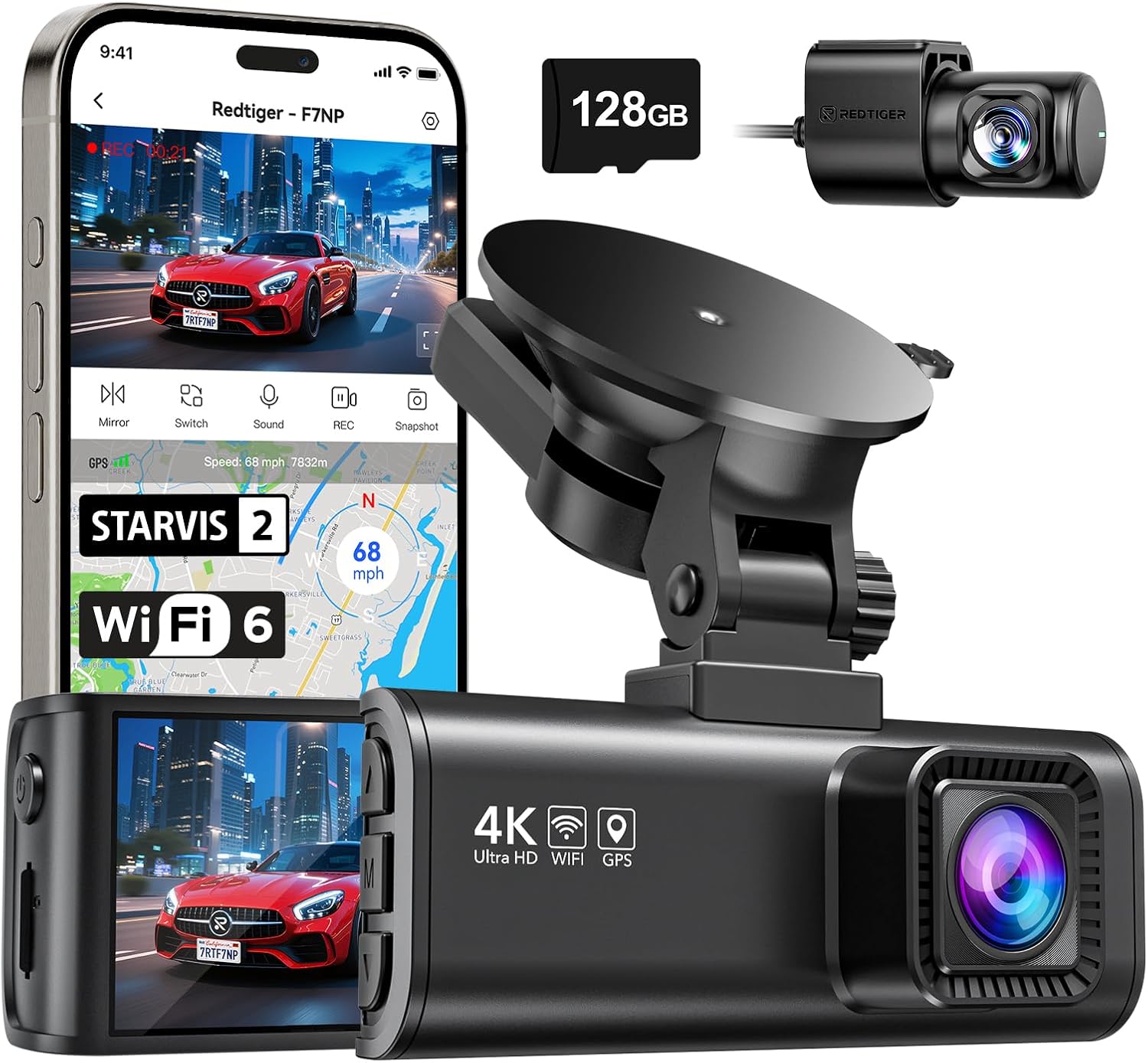
Best value-oriented front-and-rear listing to compare
5. REDTIGER F7NP 4K Front-and-Rear Dash Cam
The F7NP is another popular dual-camera listing, advertising 4K front and 1080p rear recording, a STARVIS 2 front sensor, GPS, and 5.8GHz Wi-Fi. Its appeal is the straightforward front/rear package rather than an advanced multi-camera system. For a driver who wants evidence from both ends of the vehicle without wiring a cabin camera, this is the type of setup worth comparing.
Check the exact bundle before ordering. REDTIGER has multiple F7-series listings and package variations, and included memory-card capacity or hardwire accessories can differ. The Amazon listing selected here advertises a card, but do not assume every seller or bundle has the same contents. As with any dual-camera kit, plan the rear cable route before you start installation.
- 4K front and 1080p rear recording, according to the listing.
- STARVIS 2 front sensor, GPS, and 5.8GHz Wi-Fi.
- Verify the included card and hardwire kit in the selected bundle.
How to choose a dash cam
1. Choose the camera coverage before the resolution
A front-only camera records the road ahead and is the simplest system to install. A front-and-rear kit adds evidence of rear impacts and incidents behind the car. A three-channel system adds a cabin view, which can be useful for rideshare drivers, taxi operators, and families who want to record what happens inside the vehicle. Four-channel systems can add additional cabin or side coverage, but they involve more cameras, more wiring, more storage, and more installation work.
Do not pay for a cabin camera if you will never use it. If you drive for a rideshare platform, check its policies and local privacy rules before recording passengers. If you mainly want a record of a commute, a front-and-rear system may be a better balance.
2. Look beyond the “4K” label
4K describes the number of pixels in a video frame; it does not guarantee that a camera can identify a plate at night or through glare. Sensor size and generation, lens quality, HDR processing, exposure, bitrate, frame rate, and compression all matter. A 2K camera with a good sensor and exposure can produce more useful evidence than a poorly tuned 4K camera in difficult light.
Look for independent resolution-chart tests and full-resolution sample footage. Check whether a model records 4K at 30 or 60 frames per second, whether HDR changes the frame rate, and what resolution remains when all channels are recording simultaneously. The A329S and T800 illustrate why a multi-camera system needs to be judged channel by channel.
3. Treat parking mode as a power-system decision
“24-hour parking mode” usually means the camera can monitor the vehicle when the engine is off, not that it can do so indefinitely from the standard accessory socket. Many systems require a hardwire kit or a compatible dash-cam battery pack. The kit may provide low-voltage cutoff to help protect the car battery, but you still need to check the correct fuse, vehicle electrical system, and installation instructions.
4. Buy the right memory card
High-resolution cameras write large files, and a three-channel system writes several streams at once. Use a high-endurance microSD card that meets the camera maker's speed and capacity requirements. A regular low-cost card may wear out faster under continuous loop recording. Check whether the card is included, its capacity, and the maximum capacity supported by the camera. The A329S can also record to an external SSD, but that is a different setup from a simple microSD card.
5. Check the mount, lens angle, and operating temperature
The camera should sit where it has a clear view without obstructing the driver's sightline. A wide lens captures more of the road but can make distant objects appear smaller. Adhesive mounts are compact but less convenient to move between vehicles; suction mounts are easier to reposition but may loosen in heat. A supercapacitor is generally better suited to temperature extremes than a small lithium battery, but always check the manufacturer's operating range for the exact model.
Parking mode, storage, and installation
Before installation, decide whether you need parking recording. If you only need footage while driving, a switched accessory outlet may be enough. If you want motion or impact recording while parked, read the hardwire-kit manual and confirm the camera supports the mode you want. Buffered parking mode is especially useful because it can save footage from before an impact or motion event, but it depends on the camera's settings and power source.
Run the rear-camera cable along the vehicle's trim using the supplied tools and keep it clear of airbags, pedals, moving parts, and hot surfaces. Do not route a cable across an airbag deployment path. If you are not comfortable identifying a fuse or removing trim, use a professional installer. After installation, check the live view from each camera, confirm the date and time, test loop recording, and verify that emergency clips are being locked correctly.
Also check local laws before using audio recording or filming passengers. Rules about windshield mounting, driver visibility, and recording conversations vary by jurisdiction. For rideshare or commercial use, check platform rules as well as state and local requirements.
Buying mistakes to avoid
- Buying by resolution alone. Sensor, lens, HDR, frame rate, and night performance matter just as much.
- Assuming a front-only camera records the rear. A rear camera is a separate module and needs a cable route.
- Expecting parking mode to work from any USB port. Most reliable parked recording needs a suitable hardwire kit or battery pack.
- Using a cheap, low-endurance card. Continuous loop recording is harder on storage than occasional file saving.
- Assuming bundle contents are fixed. Card capacity and hardwire accessories can vary by seller and package.
- Confusing model variants. A329S, T800, T800E, and different REDTIGER F7 bundles are not interchangeable.
How parking mode and hardwiring affect the complete setup is covered in how parking mode and hardwiring affect the complete setup.
Frequently asked questions
Is a 4K dash cam worth it?
It can be, especially if you want more detail in daylight footage, but 4K alone does not guarantee readable license plates. Look at sensor quality, HDR, frame rate, bitrate, lens, and independent sample footage. A good 2K system can be a better purchase than a weak 4K listing.
Do I need a front-and-rear dash cam?
A front-only camera is simpler and records the road ahead. A rear camera adds evidence of rear-end impacts and events behind the vehicle. If the budget and installation allow it, front-and-rear coverage is a useful upgrade for many drivers. Rideshare drivers may also want a cabin camera.
Does parking mode require a hardwire kit?
Usually, yes, if you want the camera to keep recording after the ignition is off. Some systems can use a dedicated dash-cam battery pack instead. Check the camera's parking-mode requirements and use a low-voltage cutoff or battery pack approved for that model.
How large should the microSD card be?
Follow the manufacturer's supported capacity and speed class. A front-only 4K camera uses less storage than a three-channel system recording front, rear, and cabin streams. Choose a high-endurance card and format it in the camera as recommended. Some premium models, including the A329S, can also use an external SSD.
Are dash cams legal in every state?
Dash cams are widely used, but rules about windshield placement, audio recording, and recording passengers vary. Mount the camera without obstructing the driver's view, check local recording-consent rules, and review rideshare or commercial policies before recording inside the cabin.
If you are building a broader vehicle emergency kit, compare a dash cam with the practical roadside tools in our portable jump starter guide and portable tire inflator comparison.